
Zero-Based Budgeting: The Complete Beginner Guide 2026
What if every dollar you earned had a specific destination — before you spent a single penny of it? That’s the premise behind zero-based budgeting (ZBB), and it’s the reason YNAB has a near-cult following, and why millions of people use it to eliminate debt and build genuine wealth.
This guide explains what zero-based budgeting is, how it differs from traditional budgeting, how to set it up yourself, and which tools make it effortless in 2026.
By the end of this guide you’ll understand the zero-based method completely, know whether it’s right for your life, and have a step-by-step plan to implement it today — for free.
What Is Zero-Based Budgeting?
Zero-based budgeting is a method where your income minus your planned expenditure equals zero. Every single pound of income is deliberately allocated to a category — whether that’s rent, groceries, debt repayment, or savings.
The key insight: zero doesn’t mean broke. It means every pound has a job. When you assign $200 to your emergency fund, that $200 isn’t ‘missing’ — it’s working towards a goal.
The Formula
Every dollar/pound/euro you earn is given a purpose. Nothing is left ‘floating’.
Zero-Based Budgeting vs Traditional Budgeting
Related: → Zero-Based Budgeting vs Traditional Budgeting: Which Actually Works in 2026?
Who Should Use Zero-Based Budgeting?
Zero-based budgeting is particularly powerful for:
- People living paycheck-to-paycheck who can’t figure out where the money goes
- Anyone trying to pay off significant debt aggressively
- Households where one partner earns variable income
- People who have tried budgeting before but keep drifting
- Anyone saving for a major goal (house deposit, wedding, early retirement)
It may not be the right fit if:
- Your income varies wildly month-to-month and you find rigid planning stressful
- Your expenses are already well-managed and you want a simpler overview approach
- You’re primarily focused on investment and net worth tracking rather than day-to-day spend control
You don’t have to choose between zero-based control and modern convenience. EMOH Pay supports flexible budgeting that blends zero-based allocation with automated expense tracking — giving you full control without the manual work.
How to Set Up Zero-Based Budgeting: Step-by-Step
Step 1: Calculate Your Total Monthly Income
Include all income sources: salary, freelance earnings, rental income, benefits, child support. Use net (after tax) figures. For irregular income, use the lowest month from the past 6 as your baseline.
Step 2: List Every Single Expense Category
Start with the non-negotiables (fixed expenses), then move to variables:
- Fixed: Rent/mortgage, insurance, loan repayments, phone, internet
- Variable necessities: Groceries, transport, utilities, medical
- Discretionary: Dining out, entertainment, clothing, personal care
- Savings & investments: Emergency fund, pension, ISA/RRSP/RRSP, savings goals
- Debt repayment: Any amounts above minimum payments
Step 3: Assign Every Pound a Category
Start allocating your income across your categories, non-negotiables first. Work down through necessities, then discretionary spending. What remains must go to savings or debt.
The golden rule: income minus all allocations must equal zero. If you have money left over, assign it — to savings, a holiday fund, or accelerated debt repayment. If you’re over budget, cut somewhere.
Step 4: Track Every Transaction
Zero-based budgeting only works if you track spending in real time. This is where manual ZBB systems fail — it’s simply too tedious. This is why pairing ZBB with EMOH Pay’s automatic expense tracking makes the method sustainable.
Set up automatic tracking: → How to Track Expenses Automatically
Step 5: Adjust Allocations Mid-Month When Needed
Life doesn’t follow a plan perfectly. When you overspend in one category, you must reduce another — this is the discipline that makes ZBB work. With EMOH Pay, you can adjust category budgets in real time and see the knock-on effect instantly.
Step 6: Review and Reset at Month End
At the end of each month, check every category. Assess what worked, what didn’t, and adjust next month’s allocations accordingly. Most ZBB users find they need 3 months to calibrate their budgets accurately.
Zero-Based Budgeting Example (Monthly, $3,000 Take-Home)
Common ZBB Mistakes (And How to Avoid Them)
- Forgetting irregular expenses: Annual subscriptions, car tax, birthday gifts. Solve this with sinking funds in EMOH Pay — set aside a small amount each month for each.
- Being too rigid at the start: Your first ZBB month will be wrong. That’s normal. Budget loosely in Month 1, tighten in Month 2 and 3 as you learn your real patterns.
- Not tracking every transaction: ZBB without tracking is guesswork. Connect EMOH Pay for automatic tracking so no expense slips through.
- Forgetting savings as an ‘expense’: Savings aren’t what’s left after spending — they’re a line item just like rent. Allocate them first.
Frequently Asked Questions
Q: Does zero-based budgeting mean spending everything?
No. In ZBB, every pound has a job — which means your savings, pension, and investment contributions are ‘expenses’ in your budget too. When income minus all allocations equals zero, it means nothing is floating around unassigned, not that your account is empty.
Q: How is zero-based budgeting different from the envelope method?
They are similar in philosophy but different in mechanics. ZBB allocates income to categories mathematically. The envelope method traditionally uses physical cash in labelled envelopes. Digital apps like EMOH Pay let you implement both concepts — set category budgets (ZBB) with visual limits (envelope concept) without using physical cash.
Q: What app is best for zero-based budgeting?
YNAB is the most dedicated ZBB app but costs $109/year. EMOH Pay offers flexible zero-based budgeting with automatic bank sync and household features completely free — making it the best free option for ZBB in 2026.
Q: How long does zero-based budgeting take to set up?
Your first budget will take 30–60 minutes to set up properly. Subsequent months take 15–20 minutes to review and reset. With EMOH Pay, automatic transaction import cuts the daily maintenance to near zero.
Download EMOH Pay Free — Available on iOS & Android
App Store: apps.apple.com/pk/app/emoh/id6743326641
Google Play: play.google.com/store/apps/details?id=com.buildmeapp.emoh
Continue Your Budgeting Education
→ The Ultimate Guide to Budgeting in 2026
→ Zero-Based vs Traditional Budgeting: Which Actually Works?
→ Best Budgeting Apps 2026: Tested & Ranked
→ How to Track Expenses Automatically
→ How to Calculate Your Net Worth
Try the free budget calculator
Reading is step one — EMOH Pay makes it automatic. Free to start on phone and web.
Open it➜What should you know about zero-based budgeting?
Zero-based budgeting comes down to three habits: know what comes in, decide where it goes, and check in daily. EMOH Pay makes all three effortless — free expense tracking and budgets on phone and web, a Daily Money Digest each morning, and bank-grade AES-256 security throughout.
Zero-based budgeting: the essentials
Money works better as a team sport — shared live numbers end the guesswork and the arguments.
The first win in zero-based budgeting is simply seeing where money goes. Tracking alone typically surfaces 10–15% of easy savings.
You can start zero-based budgeting today at $0 — no card required, on iPhone, Android or the web.
AES-256 encryption, read-only bank connections and PIPEDA-grade privacy keep your data yours.
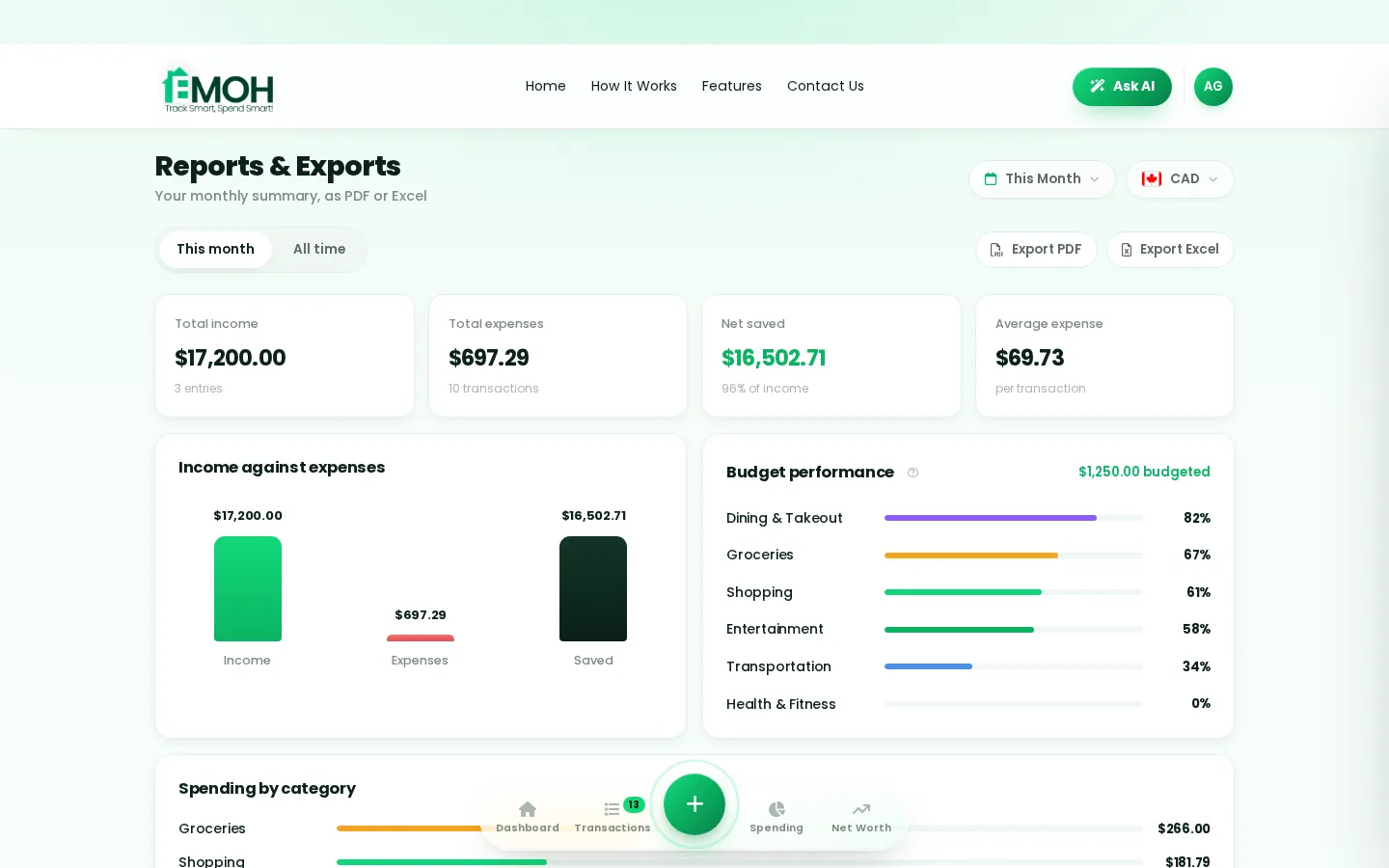
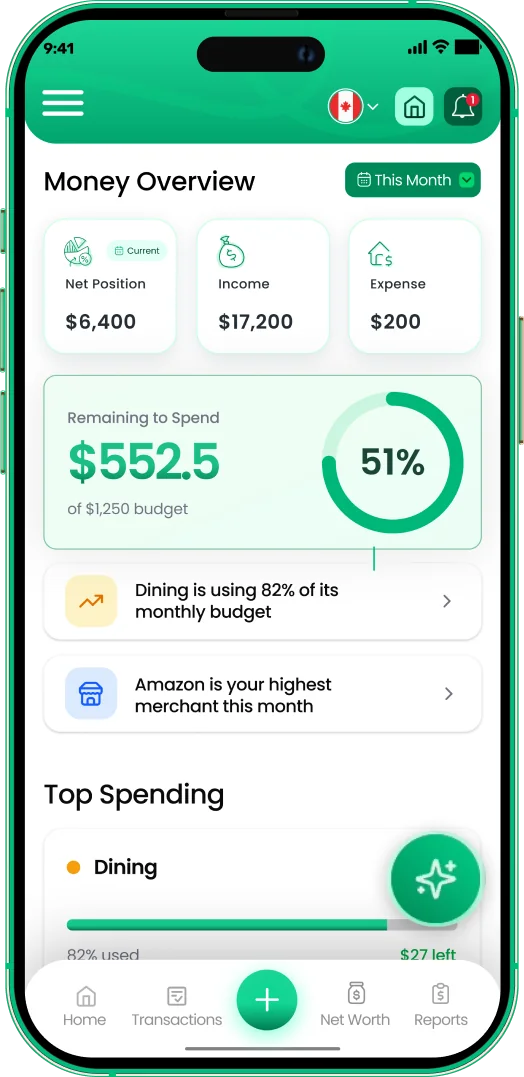
One app for zero-based budgeting — on every screen.
Track on your phone in the checkout line, review on the web app at your desk. EMOH Pay keeps zero-based budgeting in sync the second anything changes, so the numbers you act on are always current.
Start free on the web➜ Explore all features➜Real spending, really tracked
From the morning coffee to the monthly rent — Canadians log, tag and learn from every expense on EMOH Pay.

Everything you need for zero-based budgeting
Track Smart, Spend Smart! The complete toolkit, free to start:
Turn any month into a clean report you can share with a partner or accountant.
Automatic conversion for money that lives in more than one country.
Log any expense in two taps — or let bank sync do it automatically. Every dollar gets a category.
Ask questions about your own spending in plain language and get instant answers.
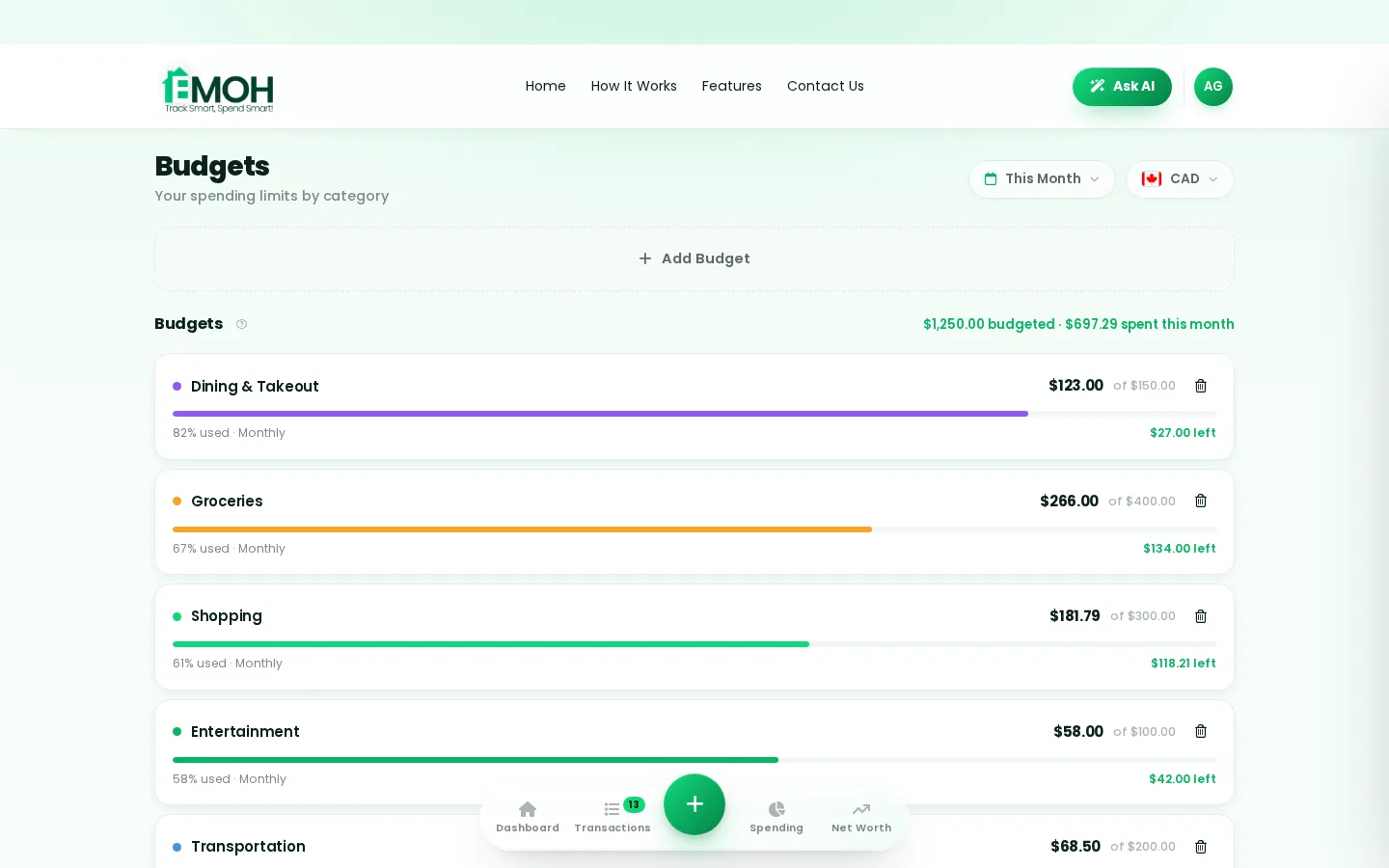
Digital envelopes for groceries, rent and fun, with gentle alerts before you overspend.
The tax portion of every expense, separated automatically for a calmer tax season.
How to start zero-based budgeting with EMOH Pay
Four small steps, five minutes total:
- 1Make your account — free, on phone or web
- 2Enter your income & accounts
- 3Set budgets — your digital envelopes
- 4Track smart, spend smart — EMOH digests daily
EMOH Pay vs. the usual ways to handle zero-based budgeting
| EMOH Pay | Spreadsheet | Typical budgeting app | |
|---|---|---|---|
| Free tier | Free forever | Free | Limited trial |
| Paid tier | EMOH Pro — $4.99/mo | — | $10–15/mo |
| Expense tracking | ✔ Two taps or automatic | Manual entry | ✔ |
| Budgets & overspend alerts | ✔ Built in | ✖ None | Varies |
| Net worth tracking | ✔ Live | Formula gymnastics | Often paid add-on |
| Phone + web sync | ✔ Instant | ✖ Manual | Varies |
| Family sharing | ✔ Free | ✖ Shared-file chaos | Often paid add-on |
| GST/HST tracking | ✔ Automatic | ✖ Formula gymnastics | ✖ Rare |
| 148 currencies | ✔ Automatic conversion | ✖ None | Limited |
| Ask AI | ✔ Included | ✖ None | ✖ Rare |
| Daily Money Digest | ✔ Built in | ✖ None | Push spam |
| PDF & Excel exports | ✔ One tap | ✔ Manual | Varies |
| Bank sync (Canada) | ✔ Plaid, read-only, free | ✖ None | US-first, patchy |
Everything above is free to start — and the full EMOH Pro upgrade is just $4.99/month, a third of what typical budgeting apps charge.
Real zero-based budgeting problems we actually solve

Zero-based budgeting that fits real life
Money habits only stick when they fit the life you already live. EMOH Pay was built for the checkout line, the kitchen-table conversation and the Sunday five-minute review — not for accountants. Two taps to log an expense, one glance to know where you stand.
Get started free➜ See how it works➜Your money data, protected like a bank's
The same encryption standard banks use, protecting your data at rest and in transit.
Bank connections run through Plaid and can only read transactions — never move money.
Built in Canada to Canadian privacy law. Your data is yours — never sold, ever.
Zero-based budgeting — frequently asked questions
Do I need to connect my bank account?
No. Manual tracking is free forever and takes two taps per expense. If you want automatic imports, connect your Canadian banks securely through Plaid with read-only access, free on every plan.
Is EMOH Pay free for zero-based budgeting?
Yes — EMOH Pay is free to start on iPhone, Android and the web. Budgeting, expense tracking and net worth are all included, which covers everything you need for zero-based budgeting. EMOH Pro lifts the limits for just $4.99/month: unlimited family members and EMOH Smart, plus the newsletter, full report history and exports.
Can I share my budget with my family?
Yes — Family Account Sharing is included free for up to 3 family members, and unlimited on EMOH Pro. Each member gets their own login while budgets and expenses stay shared in real time, which makes zero-based budgeting a team effort instead of a solo chore.
What is the best way to get started with zero-based budgeting?
Start simple: create a free EMOH Pay account, enter your income and accounts, then set budgets for your top three spending categories. Most people are fully set up in about five minutes, and the Daily Money Digest keeps the habit going.
Does EMOH Pay work on both phone and computer?
Yes. EMOH Pay has full apps for iPhone and Android plus a complete web app, and everything syncs instantly. Phone in your pocket, web app at your desk — the same live numbers everywhere.
Is my financial data safe with EMOH Pay?
Yes. EMOH Pay uses AES-256 encryption, bank connections are read-only through Plaid, and the app is built to Canadian PIPEDA privacy standards. Your data is never sold.
More from EMOH Pay
Zero-based budgeting gives every dollar a job for maximum control, while traditional budgeting sets category limits and is…
Can Easy Budgeting Tips for Beginners Help You Get Out of DebtNine easy budgeting tips for getting out of debt: track income and spending, use the 50/30/20 rule, put debt repayment first…
Free Budget CalculatorThe 50/30/20 rule splits after-tax income: 50% to needs, 30% to wants, 20% to savings. Enter your monthly take-home pay to…
Family Budgeting AppEMOH Pay is a family budgeting app made in Canada. Share one household budget, tag spending by family member, set shared…
Net Worth TrackerEMOH Pay adds up cash, TFSA, RRSP, home and car, subtracts your mortgage and loans and charts net worth month by month, for…
Start free today
Free on iPhone, Android and the web. Upgrade to EMOH Pro anytime for advanced AI and unlimited family sharing.
Download for iOS➜ Get it on Android➜
