
How to Track Your Expenses Automatically in 2026 (No Spreadsheets, No Manual Entry)
The number one reason people abandon budgets isn’t lack of motivation — it’s friction. When tracking expenses means manually logging every coffee, petrol fill-up, and online purchase, even the most disciplined person burns out within weeks.
In 2026, automatic expense tracking is completely within reach for anyone with a smartphone and a bank account. This guide walks you through exactly how it works, what to look for in an automatic expense tracking app, and how to be up and running in under 10 minutes.
EMOH Pay connects to your bank via Plaid and automatically imports, categorizes, and analyses every transaction. Most users set it up in under 10 minutes and never look at a spreadsheet again.
→ Download EMOH Pay free → App Store | → Google Play
What Is Automatic Expense Tracking?
Automatic expense tracking uses Open Banking APIs (like Plaid or Finicity) to securely connect your bank accounts, credit cards, and wallets to a budgeting app. Once connected, every transaction is imported automatically — no manual entry needed.
The app then categorizes each transaction (groceries, transport, dining, entertainment, etc.) using machine learning, shows you real-time spending insights, and alerts you when you’re approaching a budget limit.
Compare this to manual tracking:
How to Set Up Automatic Expense Tracking in 5 Steps
- Download EMOH Pay from the App Store or Google Play
- Create your free account (takes 60 seconds — no credit card required)
- Tap ‘Connect Bank Account’ and select your bank from the Plaid directory. EMOH Pay connects major Canadian banks and credit unions, including RBC, TD, Scotiabank, BMO and CIBC
- Enter your online banking credentials directly into the Plaid secure interface (EMOH Pay never sees or stores your banking password)
- Confirm your accounts — EMOH Pay will import your last 90 days of transactions and auto-categorize them. Review and adjust any categories that need correcting. Done.
Plaid uses bank-level 256-bit TLS encryption and is certified with SOC 2 Type II. Your banking credentials are entered directly into Plaid’s interface — EMOH Pay never stores or has access to your login details. Over 8,000 apps and 12,000 financial institutions use Plaid globally.
Learn more: → How EMOH Pay Works
What Happens After You Connect? (The Automatic Tracking Loop)
1. Real-Time Transaction Import
Every time you make a purchase — card payment, bank transfer, direct debit — it appears in EMOH Pay within minutes. No manual logging required.
2. Intelligent Auto-Categorization
EMOH Pay categorizes transactions automatically: a charge from ‘Loblaws’ becomes ‘Groceries’, ‘Shell’ becomes ‘Transport’, ‘Netflix’ becomes ‘Subscriptions’. You can customize categories and create rules for recurring merchants.
3. Household Member Tagging
Unlike any other free app, EMOH Pay lets you tag each transaction to a specific household member. ‘Mum’s weekly grocery run’, ‘Dad’s commute’, ‘Kids’ school meals’ — giving families a granular picture of exactly who is spending what, and where.
See this feature in action: → EMOH Pay Features
4. Budget Alerts
Set a budget limit for any category and EMOH Pay will notify you at 80% and 100% spend. No more being surprised at the end of the month.
5. Monthly Reports — Auto-Generated
Every month, EMOH Pay compiles a full spending report: total by category, comparison vs your budget, net worth change, and a savings goal progress update. Export to PDF or Excel in one tap.
6. Tax Expense Summaries
For freelancers and self-employed users, EMOH Pay generates categorized expense summaries ready for tax preparation — a feature most paid apps charge extra for.
Explore reporting: → EMOH Pay Solutions
Tips for Getting the Most from Automatic Expense Tracking
- Connect every account you use — checking, savings, all credit cards, and any investment accounts. The more complete the picture, the more accurate your budget.
- Review categories once a week for the first month. Auto-categorization is accurate but may occasionally misfile niche merchants. Teaching it your spending habits once pays off indefinitely.
- Create custom categories for things unique to your life — pet expenses, hobby subscriptions, business costs.
- Use household member tags from day one. Retrofitting them later is tedious.
- Set up savings goals alongside expense tracking — seeing your goals move in real-time is powerful motivation.
What About Multi-Currency Expenses?
If you travel frequently, live abroad, or manage finances across more than one country, EMOH Pay’s multi-currency support is a game-changer. Every foreign transaction is automatically converted at the live exchange rate and categorized in your home currency alongside your local expenses.
No other free budgeting app in 2026 offers live multi-currency expense tracking.
Read more: → Best Budgeting App for Expats & International Families
Frequently Asked Questions
Q: Can I track expenses automatically without connecting my bank?
Yes. If you prefer not to connect your bank account, EMOH Pay lets you manually log transactions or import a CSV from your bank statement. However, for truly automatic tracking with no data entry, the Plaid bank sync is strongly recommended.
Q: What banks does EMOH Pay support?
EMOH Pay connects Canadian banks through Plaid, including RBC, TD, Scotiabank, BMO and CIBC. Outside Canada, track accounts manually. If your bank isn’t listed, you can connect via manual entry or CSV import.
Q: Does EMOH Pay work in the US and Canada?
Yes. EMOH Pay works in Canada, the US and worldwide for manual tracking in 148 currencies. Automatic bank sync is currently available for Canadian banks only.
Q: How is EMOH Pay different from my bank’s own app?
Your bank’s app only shows transactions from that one institution. EMOH Pay aggregates all accounts — multiple banks, credit cards, savings accounts — into a single dashboard and adds budgeting, goal tracking, net worth monitoring, and tax summaries on top.
Q: Is EMOH Pay really free?
Yes. EMOH Pay’s core features — bank sync, automatic expense tracking, budgeting, household member tagging, net worth tracking, and tax summaries — are completely free. There is no hidden premium tier required to access these features.
Download EMOH Pay Free — Available on iOS & Android
App Store: apps.apple.com/pk/app/emoh/id6743326641
Google Play: play.google.com/store/apps/details?id=com.buildmeapp.emoh
Related Guides
→ The Ultimate Guide to Budgeting in 2026
→ Best Budgeting Apps 2026: Tested & Ranked
→ Zero-Based Budgeting vs Traditional Budgeting
→ How Couples Can Manage Money Together
→ Best Budgeting App for Families in 2026
Try the free budget calculator
Reading is step one — EMOH Pay makes it automatic. Free to start on phone and web.
Open it➜What should you know about everyday budgeting?
Everyday budgeting comes down to three habits: know what comes in, decide where it goes, and check in daily. EMOH Pay makes all three effortless — free expense tracking and budgets on phone and web, a Daily Money Digest each morning, and bank-grade AES-256 security throughout.
Everyday budgeting: the essentials
Five minutes a week with a daily digest beats a perfect spreadsheet you abandon in February.
AES-256 encryption, read-only bank connections and PIPEDA-grade privacy keep your data yours.
You can start everyday budgeting today at $0 — no card required, on iPhone, Android or the web.
Auto-categorization, recurring bills and bank sync take the admin out of the habit.
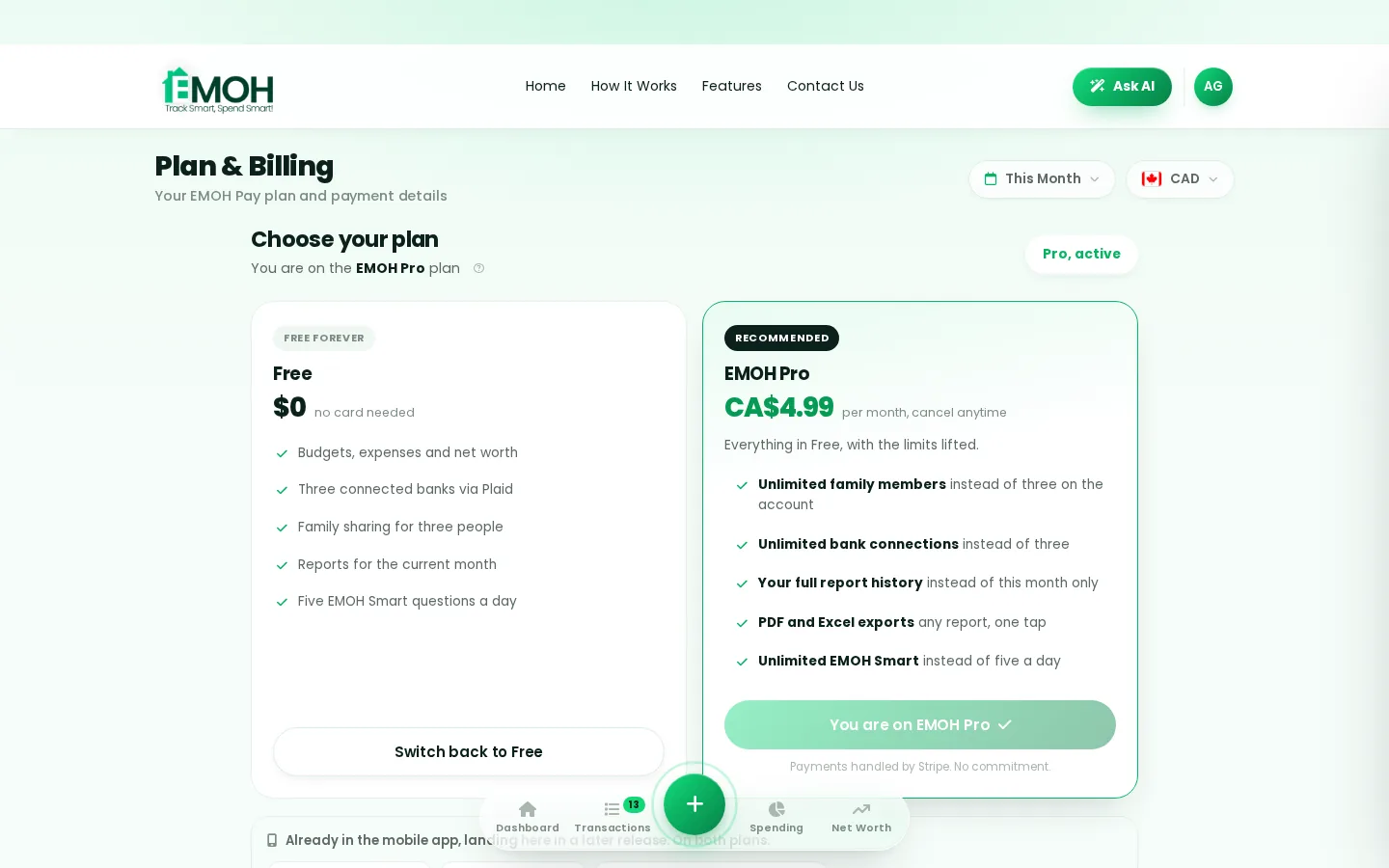
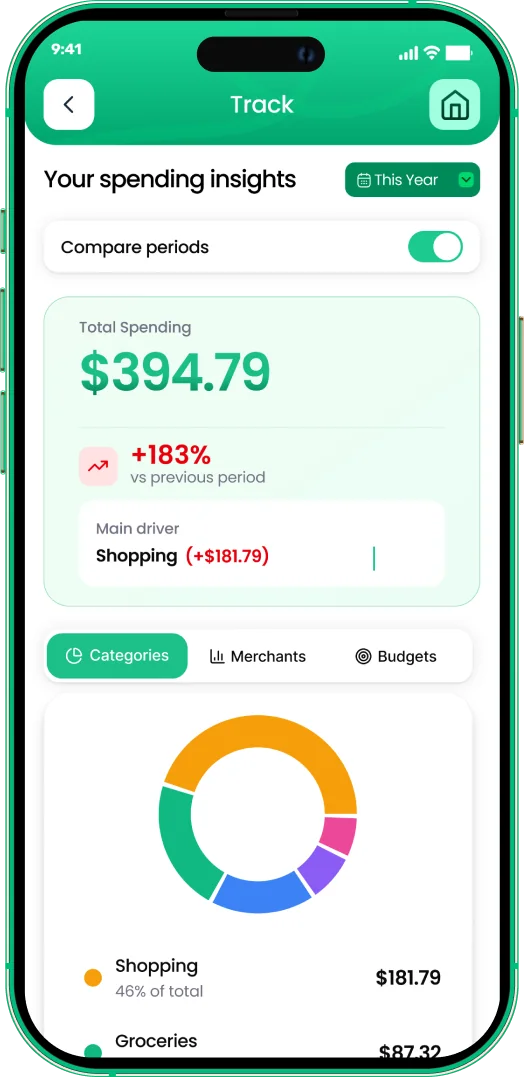
One app for everyday budgeting — on every screen.
Track on your phone in the checkout line, review on the web app at your desk. EMOH Pay keeps everyday budgeting in sync the second anything changes, so the numbers you act on are always current.
Start free on the web➜ Explore all features➜Real spending, really tracked
From the morning coffee to the monthly rent — Canadians log, tag and learn from every expense on EMOH Pay.


Everything you need for everyday budgeting
Track Smart, Spend Smart! The complete toolkit, free to start:
Everyone sees the same live numbers, each with their own login. Free forever.
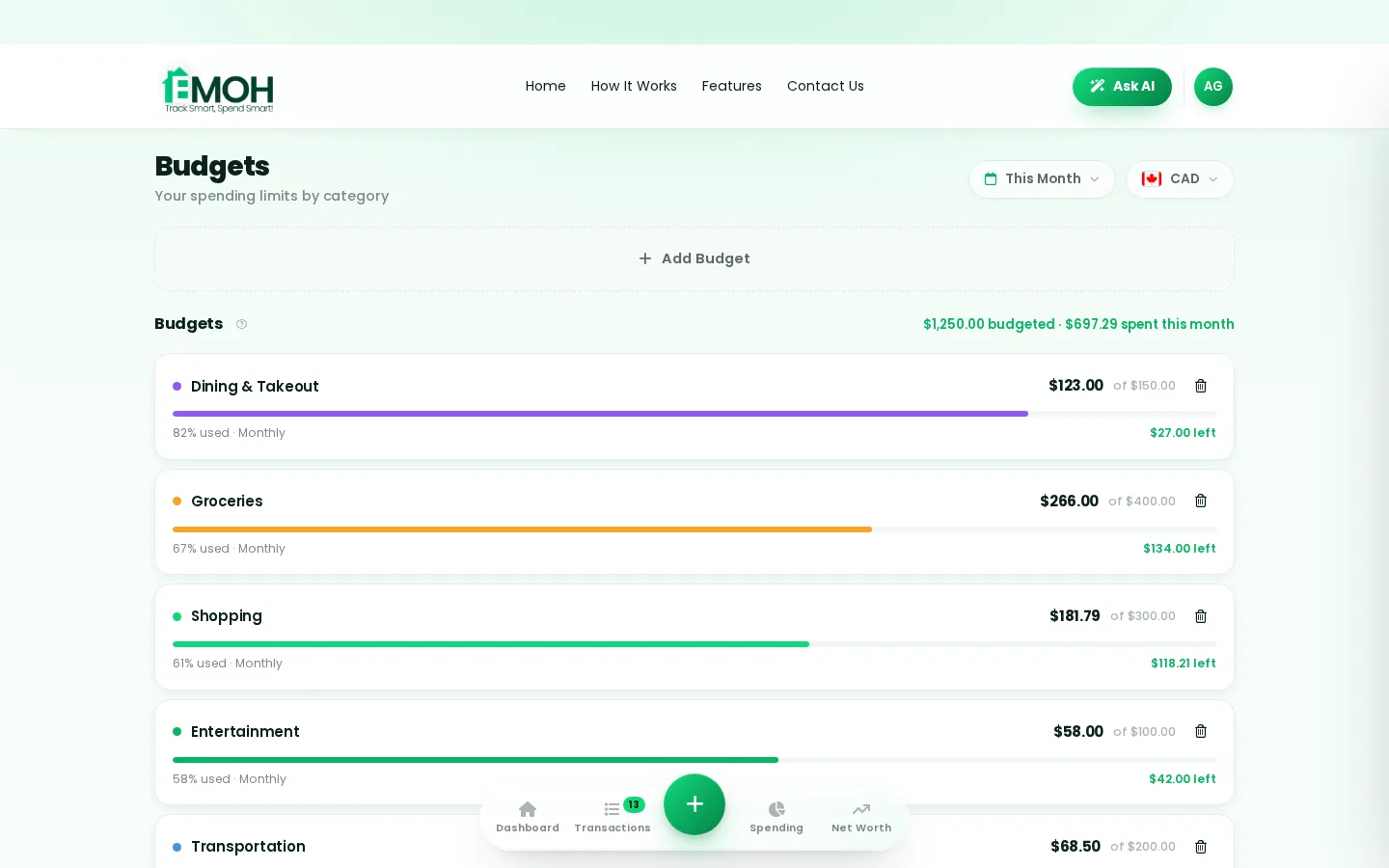
Digital envelopes for groceries, rent and fun, with gentle alerts before you overspend.
Log any expense in two taps — or let bank sync do it automatically. Every dollar gets a category.
One calm summary every morning: what you spent, what's left, what needs attention.
Assets minus debts, always current — watch the number that actually measures progress.
Vacations, emergencies, down payments — set the target and watch it fill.
How to start everyday budgeting with EMOH Pay
Four small steps, five minutes total:
- 1Make your account — free, on phone or web
- 2Enter your income & accounts
- 3Set budgets — your digital envelopes
- 4Track smart, spend smart — EMOH digests daily
EMOH Pay vs. the usual ways to handle everyday budgeting
| EMOH Pay | Spreadsheet | Typical budgeting app | |
|---|---|---|---|
| Free tier | Free forever | Free | Limited trial |
| Paid tier | EMOH Pro — $4.99/mo | — | $10–15/mo |
| Expense tracking | ✔ Two taps or automatic | Manual entry | ✔ |
| Budgets & overspend alerts | ✔ Built in | ✖ None | Varies |
| Net worth tracking | ✔ Live | Formula gymnastics | Often paid add-on |
| Phone + web sync | ✔ Instant | ✖ Manual | Varies |
| Family sharing | ✔ Free | ✖ Shared-file chaos | Often paid add-on |
| GST/HST tracking | ✔ Automatic | ✖ Formula gymnastics | ✖ Rare |
| 148 currencies | ✔ Automatic conversion | ✖ None | Limited |
| Ask AI | ✔ Included | ✖ None | ✖ Rare |
| Daily Money Digest | ✔ Built in | ✖ None | Push spam |
| PDF & Excel exports | ✔ One tap | ✔ Manual | Varies |
| Bank sync (Canada) | ✔ Plaid, read-only, free | ✖ None | US-first, patchy |
Everything above is free to start — and the full EMOH Pro upgrade is just $4.99/month, a third of what typical budgeting apps charge.
Real everyday budgeting problems we actually solve

Everyday budgeting that fits real life
Money habits only stick when they fit the life you already live. EMOH Pay was built for the checkout line, the kitchen-table conversation and the Sunday five-minute review — not for accountants. Two taps to log an expense, one glance to know where you stand.
Get started free➜ See how it works➜Your money data, protected like a bank's
The same encryption standard banks use, protecting your data at rest and in transit.
Bank connections run through Plaid and can only read transactions — never move money.
Built in Canada to Canadian privacy law. Your data is yours — never sold, ever.
Everyday budgeting — frequently asked questions
Does EMOH Pay work on both phone and computer?
Yes. EMOH Pay has full apps for iPhone and Android plus a complete web app, and everything syncs instantly. Phone in your pocket, web app at your desk — the same live numbers everywhere.
Do I need to connect my bank account?
No. Manual tracking is free forever and takes two taps per expense. If you want automatic imports, connect your Canadian banks securely through Plaid with read-only access, free on every plan.
How is EMOH Pay different from a spreadsheet?
Spreadsheets are flexible but manual: no reminders, no sync, no automatic categorization. EMOH Pay gives you the same control with live sync across devices, daily digests, gentle overspend alerts and one-tap reports.
Is EMOH Pay free for everyday budgeting?
Yes — EMOH Pay is free to start on iPhone, Android and the web. Budgeting, expense tracking and net worth are all included, which covers everything you need for everyday budgeting. EMOH Pro lifts the limits for just $4.99/month: unlimited family members and EMOH Smart, plus the newsletter, full report history and exports.
What is the best way to get started with everyday budgeting?
Start simple: create a free EMOH Pay account, enter your income and accounts, then set budgets for your top three spending categories. Most people are fully set up in about five minutes, and the Daily Money Digest keeps the habit going.
Is my financial data safe with EMOH Pay?
Yes. EMOH Pay uses AES-256 encryption, bank connections are read-only through Plaid, and the app is built to Canadian PIPEDA privacy standards. Your data is never sold.
More from EMOH Pay
Log each expense by hand for the most awareness, import transactions automatically, or mix both with a weekly 5-minute…
Free Budget CalculatorThe 50/30/20 rule splits after-tax income: 50% to needs, 30% to wants, 20% to savings. Enter your monthly take-home pay to…
Best Budgeting Apps CanadaBest Budgeting Apps in Canada: EMOH Pay leads for Canadians, with honest rankings of the alternatives. Updated for 2026.…
Free Budgeting App CanadaEMOH Pay is a budgeting app made in Canada, free to start on iPhone, Android and the web. Set budgets, track spending in…
Start free today
Free on iPhone, Android and the web. Upgrade to EMOH Pro anytime for advanced AI and unlimited family sharing.
Download for iOS➜ Get it on Android➜
