
How to Track Expenses Automatically (Without Spreadsheets) in the US & Canada (2026 Guide)
Managing your money in the US or Canada can get complicated—between subscriptions, credit cards, rising living costs, and daily expenses, it’s easy to lose track of where your money is going.
Many people still rely on spreadsheets to manage their finances. But manually tracking every transaction isn’t just time-consuming—it’s unrealistic for most people.
Today, a growing number of people are switching to simpler, automated tools that handle tracking in the background, giving them a clear view of their finances without the extra effort.
What Is Automatic Expense Tracking?
Automatic expense tracking uses digital tools to:
- Record transactions in real time
- Categorize spending automatically
- Sync across multiple accounts
- Provide instant insights into your finances
Instead of managing data manually, modern tools quietly organize your finances for you—so you can focus on decisions, not data entry.
Some newer platforms even combine expense tracking, budgeting, and net worth insights in one place, making it easier to see the full picture without switching between apps.
Step 1: Use an Expense Tracker App Built for North America
Look for features like:
- Multi-account tracking (credit + debit)
- Support for USD and CAD
- Automatic categorization
- Real-time syncing
The best tools like EMOH Pay are designed to feel effortless—minimal setup, clean dashboards, and clear insights without overwhelming you with complexity.
For example, some modern apps focus on household-level budgeting and simplified financial visibility, which can be especially useful for families or shared finances.
Step 3: Set Up Smart Categories
Organizing your spending helps you understand where your money goes.
Most modern apps come with pre-built categories that adjust automatically, so you don’t have to spend time organizing everything yourself.
This makes it easier to stay consistent without constantly managing your system.
Step 5: Use Visual Insights
Numbers alone can be hard to interpret.
That’s why newer financial tools focus heavily on:
- Clean dashboards
- Spending breakdowns
- Net worth tracking
- Monthly trends
Instead of digging through spreadsheets, you get a clear, visual snapshot of your financial health at a glance.
Best Practices for Expense Tracking in the US & Canada
Beyond daily expenses, it helps to track:
- Savings
- Assets
- Liabilities
Some platforms now combine all of these into a single dashboard, helping you move from simple budgeting to complete financial awareness.
Spreadsheets vs Automatic Expense Tracking
Conclusion
Tracking your expenses doesn’t need to be complicated or time-consuming.
For people in the US and Canada, where financial complexity is higher, switching to automatic expense tracking can:
- Simplify your financial life
- Improve budgeting accuracy
- Help you make smarter money decisions
The most effective systems today aren’t just about tracking expenses—they’re about giving you clarity, consistency, and control in one place.
Frequently Asked Questions (FAQ)
What is automatic expense tracking?
The easiest way is to use an expense tracker app that automatically records and categorizes your transactions in real time. This eliminates the need for manual entry and helps you stay consistent.
Are budgeting apps better than spreadsheets?
Yes, budgeting apps are generally more effective than spreadsheets because they automate tracking, reduce errors, and provide real-time insights. Spreadsheets require manual updates and are harder to maintain long term.
Can I track expenses across multiple accounts and cards?
Yes, most modern expense tracking tools allow you to track spending across multiple accounts, including credit cards, debit cards, and even cash entries, giving you a complete financial overview.
How often should I check my expenses?
A weekly review is recommended. It helps you stay aware of your spending without feeling overwhelmed by daily tracking.
What categories should I use for expense tracking?
Start with simple categories like:
- Housing (rent/mortgage)
- Groceries
- Transportation
- Dining
- Subscriptions
- Savings
Many apps automatically assign categories, making the process easier.
Is automatic expense tracking safe?
Most reputable financial apps use bank-level encryption and security protocols to protect your data. Always choose a trusted platform with strong privacy policies.
Can I track expenses without linking my bank account?
Yes, many tools allow manual or semi-automatic tracking if you prefer not to connect your bank accounts. This still provides structure without compromising privacy.
What is the best expense tracker for families or shared budgets?
The best tools for families are those that support shared visibility, multiple users, and household-level budgeting—making it easier to manage finances together in one place.
How do I stop overspending using expense tracking?
By reviewing your spending regularly, setting category limits, and identifying patterns, you can quickly spot areas where you’re overspending and adjust your habits.
Do I need to track every small expense?
Not necessarily. While small expenses add up, focusing on major categories like housing, food, and transportation will have the biggest impact on your budget.
Explore budgeting in your province
Reading is step one — EMOH Pay makes it automatic. Free to start on phone and web.
Open it➜What should you know about everyday budgeting?
Everyday budgeting comes down to three habits: know what comes in, decide where it goes, and check in daily. EMOH Pay makes all three effortless — free expense tracking and budgets on phone and web, a Daily Money Digest each morning, and bank-grade AES-256 security throughout.
Everyday budgeting: the essentials
You can start everyday budgeting today at $0 — no card required, on iPhone, Android or the web.
Auto-categorization, recurring bills and bank sync take the admin out of the habit.
The first win in everyday budgeting is simply seeing where money goes. Tracking alone typically surfaces 10–15% of easy savings.
Five minutes a week with a daily digest beats a perfect spreadsheet you abandon in February.
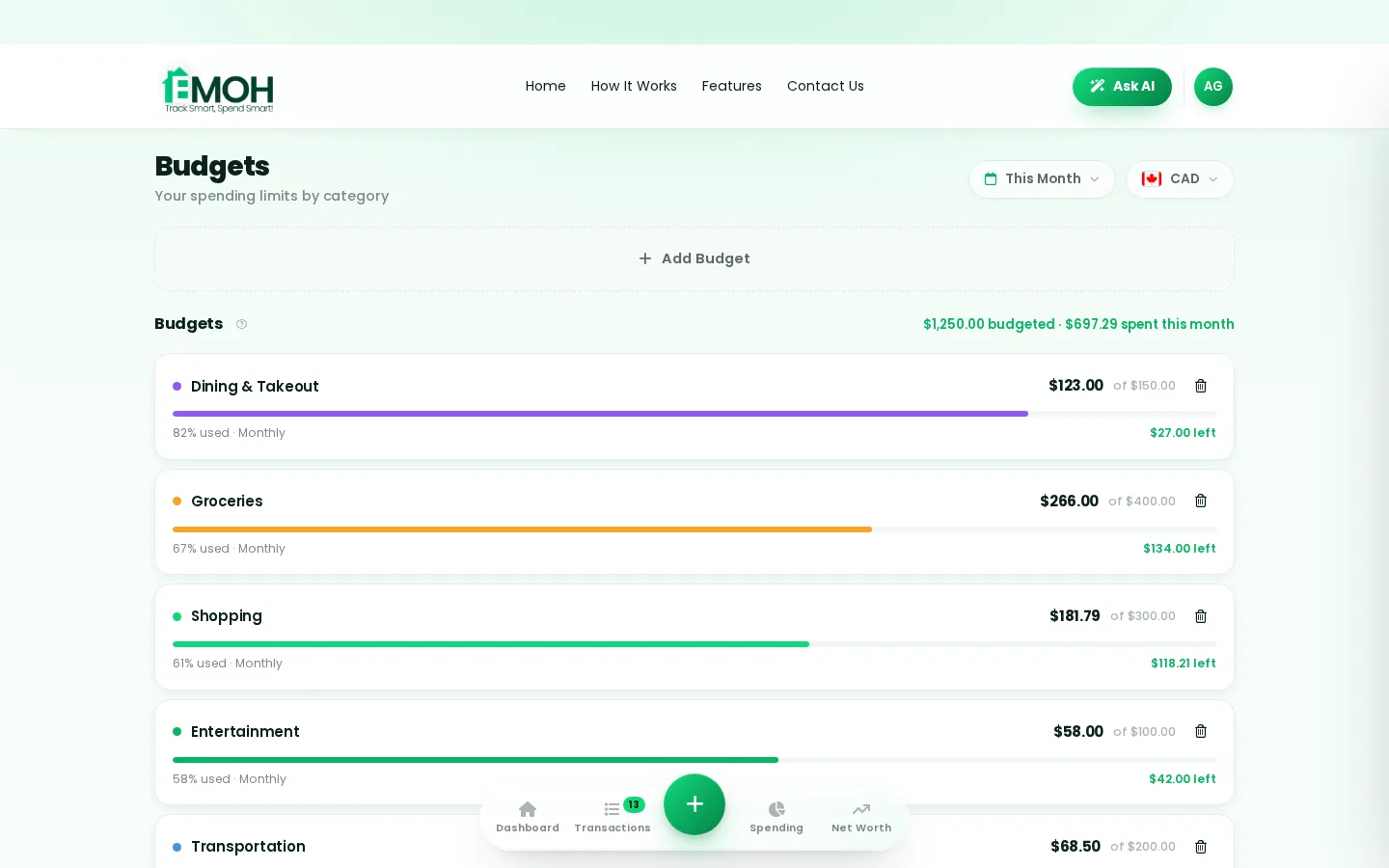
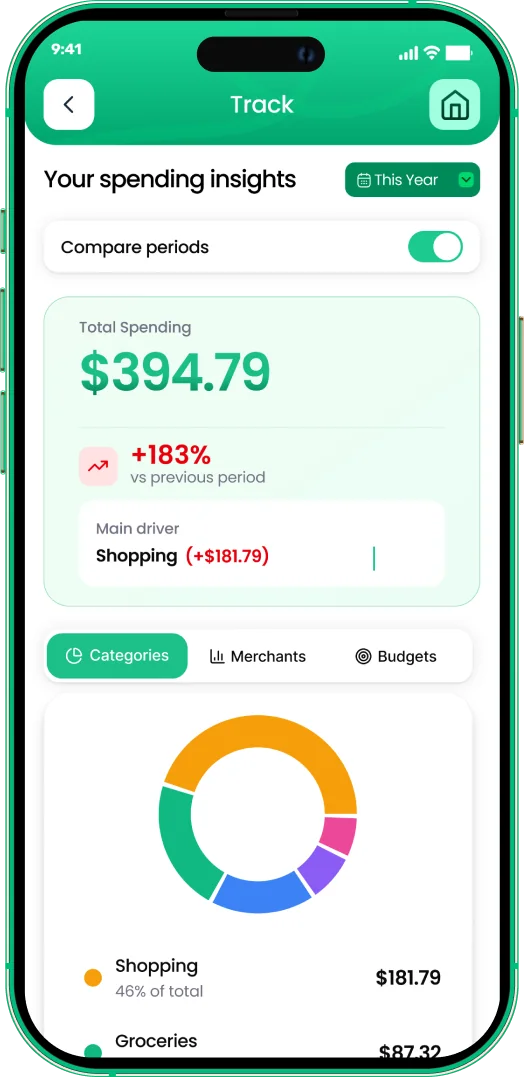
One app for everyday budgeting — on every screen.
Track on your phone in the checkout line, review on the web app at your desk. EMOH Pay keeps everyday budgeting in sync the second anything changes, so the numbers you act on are always current.
Start free on the web➜ Explore all features➜Real spending, really tracked
From the morning coffee to the monthly rent — Canadians log, tag and learn from every expense on EMOH Pay.


Everything you need for everyday budgeting
Track Smart, Spend Smart! The complete toolkit, free to start:
Turn any month into a clean report you can share with a partner or accountant.
Vacations, emergencies, down payments — set the target and watch it fill.
Log any expense in two taps — or let bank sync do it automatically. Every dollar gets a category.
Automatic conversion for money that lives in more than one country.
Everyone sees the same live numbers, each with their own login. Free forever.
Assets minus debts, always current — watch the number that actually measures progress.
How to start everyday budgeting with EMOH Pay
Four small steps, five minutes total:
- 1Make your account — free, on phone or web
- 2Enter your income & accounts
- 3Set budgets — your digital envelopes
- 4Track smart, spend smart — EMOH digests daily
EMOH Pay vs. the usual ways to handle everyday budgeting
| EMOH Pay | Spreadsheet | Typical budgeting app | |
|---|---|---|---|
| Free tier | Free forever | Free | Limited trial |
| Paid tier | EMOH Pro — $4.99/mo | — | $10–15/mo |
| Expense tracking | ✔ Two taps or automatic | Manual entry | ✔ |
| Budgets & overspend alerts | ✔ Built in | ✖ None | Varies |
| Net worth tracking | ✔ Live | Formula gymnastics | Often paid add-on |
| Phone + web sync | ✔ Instant | ✖ Manual | Varies |
| Family sharing | ✔ Free | ✖ Shared-file chaos | Often paid add-on |
| GST/HST tracking | ✔ Automatic | ✖ Formula gymnastics | ✖ Rare |
| 148 currencies | ✔ Automatic conversion | ✖ None | Limited |
| Ask AI | ✔ Included | ✖ None | ✖ Rare |
| Daily Money Digest | ✔ Built in | ✖ None | Push spam |
| PDF & Excel exports | ✔ One tap | ✔ Manual | Varies |
| Bank sync (Canada) | ✔ Plaid, read-only — free up to 3 banks | ✖ None | US-first, patchy |
Everything above is free to start — and the full EMOH Pro upgrade is just $4.99/month, a third of what typical budgeting apps charge.
Real everyday budgeting problems we actually solve

Everyday budgeting that fits real life
Money habits only stick when they fit the life you already live. EMOH Pay was built for the checkout line, the kitchen-table conversation and the Sunday five-minute review — not for accountants. Two taps to log an expense, one glance to know where you stand.
Get started free➜ See how it works➜Your money data, protected like a bank's
The same encryption standard banks use, protecting your data at rest and in transit.
Bank connections run through Plaid and can only read transactions — never move money.
Built in Canada to Canadian privacy law. Your data is yours — never sold, ever.
Everyday budgeting — frequently asked questions
How is EMOH Pay different from a spreadsheet?
Spreadsheets are flexible but manual: no reminders, no sync, no automatic categorization. EMOH Pay gives you the same control with live sync across devices, daily digests, gentle overspend alerts and one-tap reports.
Does EMOH Pay work on both phone and computer?
Yes. EMOH Pay has full apps for iPhone and Android plus a complete web app, and everything syncs instantly. Phone in your pocket, web app at your desk — the same live numbers everywhere.
Is EMOH Pay free for everyday budgeting?
Yes — EMOH Pay is free to start on iPhone, Android and the web. Budgeting, expense tracking and net worth are all included, which covers everything you need for everyday budgeting. EMOH Pro lifts the limits for just $4.99/month — unlimited bank connections, family members and EMOH Smart, plus full report history and exports.
What is the best way to get started with everyday budgeting?
Start simple: create a free EMOH Pay account, enter your income and accounts, then set budgets for your top three spending categories. Most people are fully set up in about five minutes, and the Daily Money Digest keeps the habit going.
Do I need to connect my bank account?
No. Manual tracking is free forever and takes two taps per expense. If you want automatic imports, connect a Canadian bank securely through Plaid with read-only access — three banks on Free, unlimited on Pro.
Is my financial data safe with EMOH Pay?
Yes. EMOH Pay uses AES-256 encryption, bank connections are read-only through Plaid, and the app is built to Canadian PIPEDA privacy standards. Your data is never sold.
More from EMOH Pay
The number one reason people abandon budgets isn’t lack of motivation — it’s friction. When tracking expenses means manually…
How to Track ExpensesTracking expenses means recording where money actually goes — the foundation under every budget. Manual, automatic, or…
How Tracking Your Expenses Year-Round with EMOH Pay Makes FiliFiling a tax return in Canada can feel overwhelming for many people. The stress usually comes from missing receipts…
Free Budget CalculatorThe 50/30/20 rule splits after-tax income: 50% to needs, 30% to wants, 20% to savings. Enter your monthly take-home pay to…
Best Budgeting Apps CanadaBest Budgeting Apps in Canada: EMOH Pay leads for Canadians, with honest rankings of the alternatives. Updated for 2026.…
Free Budgeting App CanadaEMOH Pay is a budgeting app made in Canada — free to start on iPhone, Android and the web. Set monthly budgets, track…
Start free today
Free on iPhone, Android and the web. Upgrade to EMOH Pro anytime for bank sync and advanced AI.
Download for iOS➜ Get it on Android➜