The number one reason people abandon budgets isn’t lack of motivation — it’s friction. When tracking expenses means manually logging every coffee, petrol fill-up, and online purchase, even the most disciplined person burns out within weeks.
In 2026, automatic expense tracking is completely within reach for anyone with a smartphone and a bank account. This guide walks you through exactly how it works, what to look for in an automatic expense tracking app, and how to be up and running in under 10 minutes.
| Skip the Manual Work
EMOH Pay connects to your bank via Plaid and automatically imports, categorizes, and analyses every transaction. Most users set it up in under 10 minutes and never look at a spreadsheet again. |
→ Download EMOH Pay free → App Store | → Google Play
What Is Automatic Expense Tracking?
Automatic expense tracking uses Open Banking APIs (like Plaid or Finicity) to securely connect your bank accounts, credit cards, and wallets to a budgeting app. Once connected, every transaction is imported automatically — no manual entry needed.
The app then categorises each transaction (groceries, transport, dining, entertainment, etc.) using machine learning, shows you real-time spending insights, and alerts you when you’re approaching a budget limit.
Compare this to manual tracking:
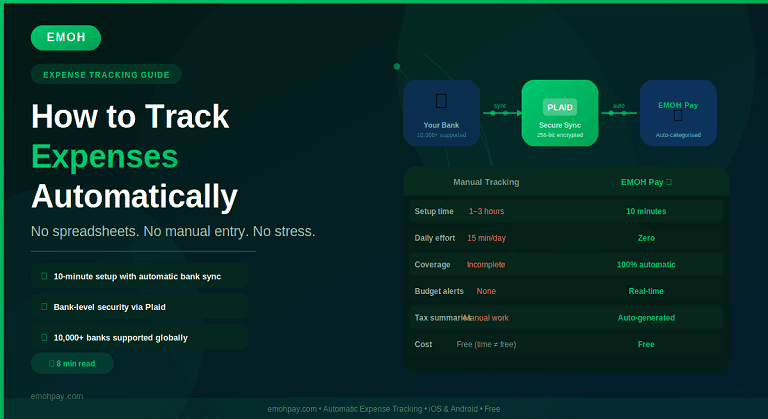
| Manual / Spreadsheet | Automatic (EMOH Pay) | |
| Setup time | 1–3 hours | Under 10 minutes |
| Daily time required | 5–15 min/day | 0 — runs in background |
| Error rate | High (human input errors) | Very low (bank-verified data) |
| Transaction coverage | Only what you remember | 100% of bank/card transactions |
| Reports | Manual formulas | Auto-generated, exportable |
| Multi-currency | Complex formula workarounds | Live exchange rates built in |
| Cost | Free (but time = money) | Free with EMOH Pay |
How to Set Up Automatic Expense Tracking in 5 Steps
- Download EMOH Pay from the App Store or Google Play
- Create your free account (takes 60 seconds — no credit card required)
- Tap ‘Connect Bank Account’ and select your bank from the Plaid directory. Plaid supports 10,000+ banks and credit unions including Chase, TD, HSBC, Barclays, and most major global institutions
- Enter your online banking credentials directly into the Plaid secure interface (EMOH Pay never sees or stores your banking password)
- Confirm your accounts — EMOH Pay will import your last 90 days of transactions and auto-categorise them. Review and adjust any categories that need correcting. Done.
| Is It Safe?
Plaid uses bank-level 256-bit TLS encryption and is certified with SOC 2 Type II. Your banking credentials are entered directly into Plaid’s interface — EMOH Pay never stores or has access to your login details. Over 8,000 apps and 12,000 financial institutions use Plaid globally. |
Learn more: → How EMOH Pay Works
What Happens After You Connect? (The Automatic Tracking Loop)
1. Real-Time Transaction Import
Every time you make a purchase — card payment, bank transfer, direct debit — it appears in EMOH Pay within minutes. No manual logging required.
2. Intelligent Auto-Categorisation
EMOH Pay categorises transactions automatically: a charge from ‘Tesco’ becomes ‘Groceries’, ‘Shell’ becomes ‘Transport’, ‘Netflix’ becomes ‘Subscriptions’. You can customise categories and create rules for recurring merchants.
3. Household Member Tagging
Unlike any other free app, EMOH Pay lets you tag each transaction to a specific household member. ‘Mum’s weekly grocery run’, ‘Dad’s commute’, ‘Kids’ school meals’ — giving families a granular picture of exactly who is spending what, and where.
See this feature in action: → EMOH Pay Features
4. Budget Alerts
Set a budget limit for any category and EMOH Pay will notify you at 80% and 100% spend. No more being surprised at the end of the month.
5. Monthly Reports — Auto-Generated
Every month, EMOH Pay compiles a full spending report: total by category, comparison vs your budget, net worth change, and a savings goal progress update. Export to PDF or Excel in one tap.
6. Tax Expense Summaries
For freelancers and self-employed users, EMOH Pay generates categorised expense summaries ready for tax preparation — a feature most paid apps charge extra for.
Explore reporting: → EMOH Pay Solutions
Tips for Getting the Most from Automatic Expense Tracking
- Connect every account you use — checking, savings, all credit cards, and any investment accounts. The more complete the picture, the more accurate your budget.
- Review categories once a week for the first month. Auto-categorisation is accurate but may occasionally misfile niche merchants. Teaching it your spending habits once pays off indefinitely.
- Create custom categories for things unique to your life — pet expenses, hobby subscriptions, business costs.
- Use household member tags from day one. Retrofitting them later is tedious.
- Set up savings goals alongside expense tracking — seeing your goals move in real-time is powerful motivation.
What About Multi-Currency Expenses?
If you travel frequently, live abroad, or manage finances across more than one country, EMOH Pay’s multi-currency support is a game-changer. Every foreign transaction is automatically converted at the live exchange rate and categorised in your home currency alongside your local expenses.
No other free budgeting app in 2026 offers live multi-currency expense tracking.
Read more: → Best Budgeting App for Expats & International Families
Frequently Asked Questions
Q: Can I track expenses automatically without connecting my bank?
Yes. If you prefer not to connect your bank account, EMOH Pay lets you manually log transactions or import a CSV from your bank statement. However, for truly automatic tracking with no data entry, the Plaid bank sync is strongly recommended.
Q: What banks does EMOH Pay support?
EMOH Pay connects via Plaid, which supports 10,000+ banks and credit unions globally including Chase, Bank of America, TD, Scotiabank, HSBC, Barclays, and most major global institutions. If your bank isn’t listed, you can connect via manual entry or CSV import.
Q: Does EMOH Pay work in the US and Canada?
Yes. EMOH Pay is available globally and works in the US, Canada, UK, and over 100 other countries. Bank sync via Plaid works seamlessly across North America.
Q: How is EMOH Pay different from my bank’s own app?
Your bank’s app only shows transactions from that one institution. EMOH Pay aggregates all accounts — multiple banks, credit cards, savings accounts — into a single dashboard and adds budgeting, goal tracking, net worth monitoring, and tax summaries on top.
Q: Is EMOH Pay really free?
Yes. EMOH Pay’s core features — bank sync, automatic expense tracking, budgeting, household member tagging, net worth tracking, and tax summaries — are completely free. There is no hidden premium tier required to access these features.
| Ready to Take Control of Your Finances?
Download EMOH Pay Free — Available on iOS & Android App Store: apps.apple.com/pk/app/emoh/id6743326641 Google Play: play.google.com/store/apps/details?id=com.buildmeapp.emoh |
Related Guides
→ The Ultimate Guide to Budgeting in 2026
→ Best Budgeting Apps 2026: Tested & Ranked
→ Zero-Based Budgeting vs Traditional Budgeting