
Why Expense Tracking Is the Secret to Saving More Money
1. What Is Expense Tracking and Why Does It Matter?
Expense tracking simply means recording where your money goes — every dollar in, every dollar out. But today, smart households in Canada are using a budgeting app to track spending automatically.
Whether you are trying to save money, reduce debt, or understand your monthly spending habits, tracking expenses is the foundation of money management.
When you consistently track your expenses effectively, it becomes easier to:
- Notice unnecessary spending
- Build better savings habits
- Improve financial discipline
- Understand your finances at a glance
And most importantly — saving money by tracking expenses becomes effortless.
2. The Psychology Behind Spending: Why We Overspend
Most people don’t overspend because they want to — they overspend because they don’t realize where their money is going.
Common reasons include:
- Emotional purchases
- “Small” daily spending that adds up
- Lack of real-time visibility
- No clear boundaries or budgeting plan
This is where spending habits and tracking become powerful. A personal finance tracker gives you the awareness you need to make better decisions.
3. How a Budgeting App Helps You Track Expenses More Effectively
A modern budgeting app is not just a digital notebook — it’s a smart tool with automated features that make money management easy.
A good expense tracker provides:
- Real-time spending insights
- Overspending alerts
- Automatic categorization
- Daily, weekly, and monthly summaries
- Goal-tracking features
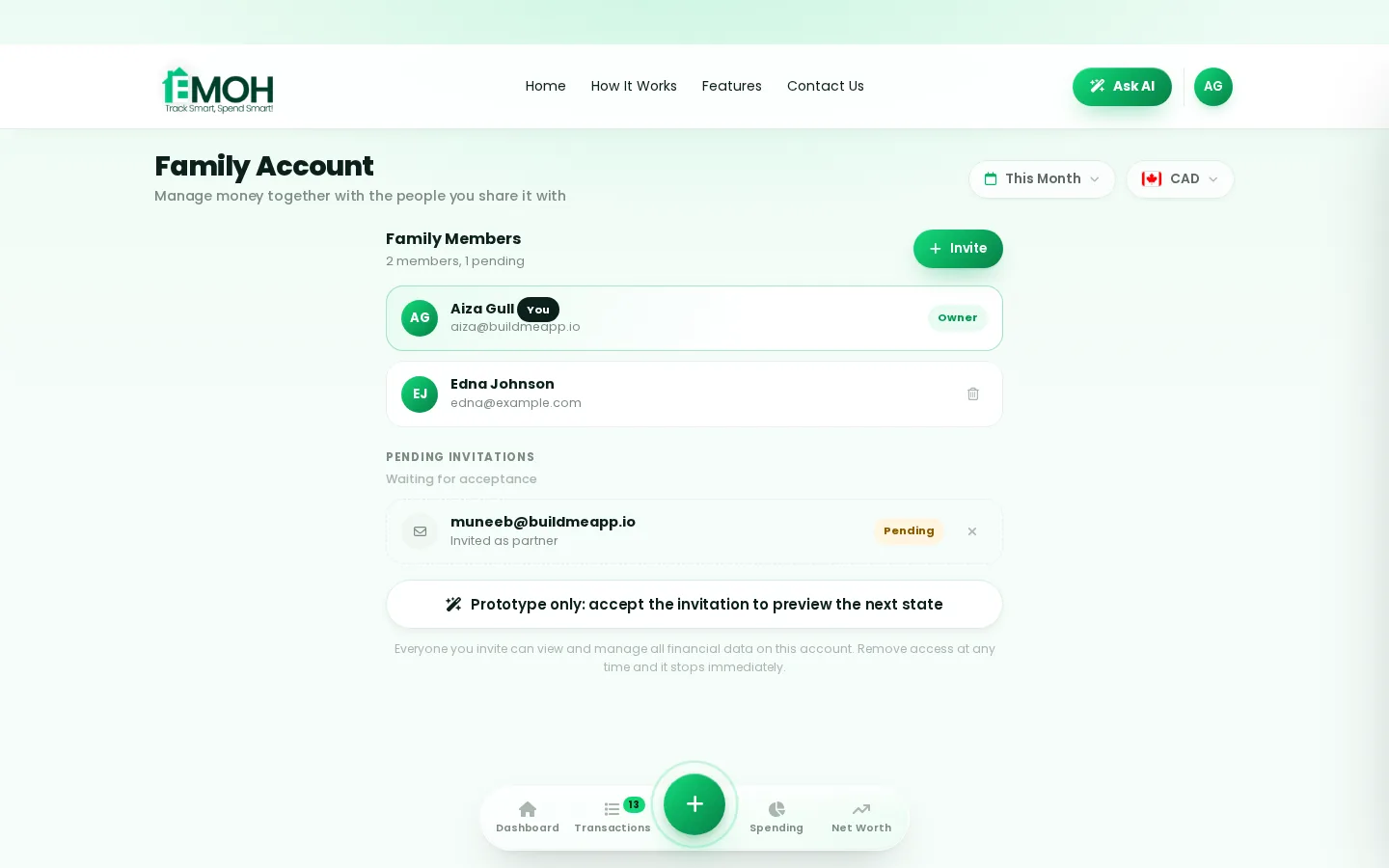
- Shared expense tracking household options
In Canada, tools like EMOH Pay help people:
- Track expenses
- Build household budgets
- Assign categories
- Monitor savings
- Improve long-term financial habits
This combination of budgeting and expense tracking is what truly helps families stay in control.
4. Benefits of Real-Time Expense Tracking
Real-time tracking is the reason people who use a budgeting app save significantly more money.
Instant visibility = better decisions
You know:
- How much you’ve already spent
- How much budget remains
- What category is overshooting
- Which expenses can be reduce
Why real-time tracking works so well
- Helps prevent impulsive purchases
- Strengthens financial discipline
- Eliminates end-of-month surprises
- Sends overspending alerts
This approach makes saving money feel natural and effortless.
5. Daily Expense Tracking Tips for Busy Individuals
Don’t have time to log everything manually?
Good news — you don’t need to.
Here’s how to track your expenses effectively every single day:
Tip 1: Use a budgeting app
Manual tracking is hard. A smart app categorizes everything for you.
Tip 2: Review your expenses nightly (2–3 minutes)
A quick daily review keeps your spending on track.
Tip 3: Use consistent categories
It improves your expense categories and analysis accuracy.
Tip 4: Set savings goals
Your mind naturally adjusts spending when a goal is visible.
Tip 5: Turn on push notifications
Overspending alerts act as a reality check.
Tip 6: Log cash transactions immediately
Cash is the easiest to forget — record it instantly.
6. Family Expense Tracking: Why Households Save More Together
For families, expense tracking is not just helpful — it’s life-changing.
Why families save more
- Shared visibility = shared responsibility
- No confusion over who paid what
- No repetitive purchases
- Expenses become predictable
- Reduces financial stress
Shared household tracking (perfect for EMOH Pay)
A shared expense tracking household makes it easy to:
- Manage groceries
- Track bill payments
- Split household costs
- Plan savings together
Families that track expenses together build stronger money habits.
7. Expense Categories and Analysis: How to Understand Your Money
Organizing expenses into categories makes budgeting effortless.
Common categories:
- Food
- Transportation
- Home
- Healthcare
- Entertainment
- Child-related
- Savings
- Miscellaneous
Why categorization matters:
- Helps identify where overspending happens
- Highlights unnecessary purchases
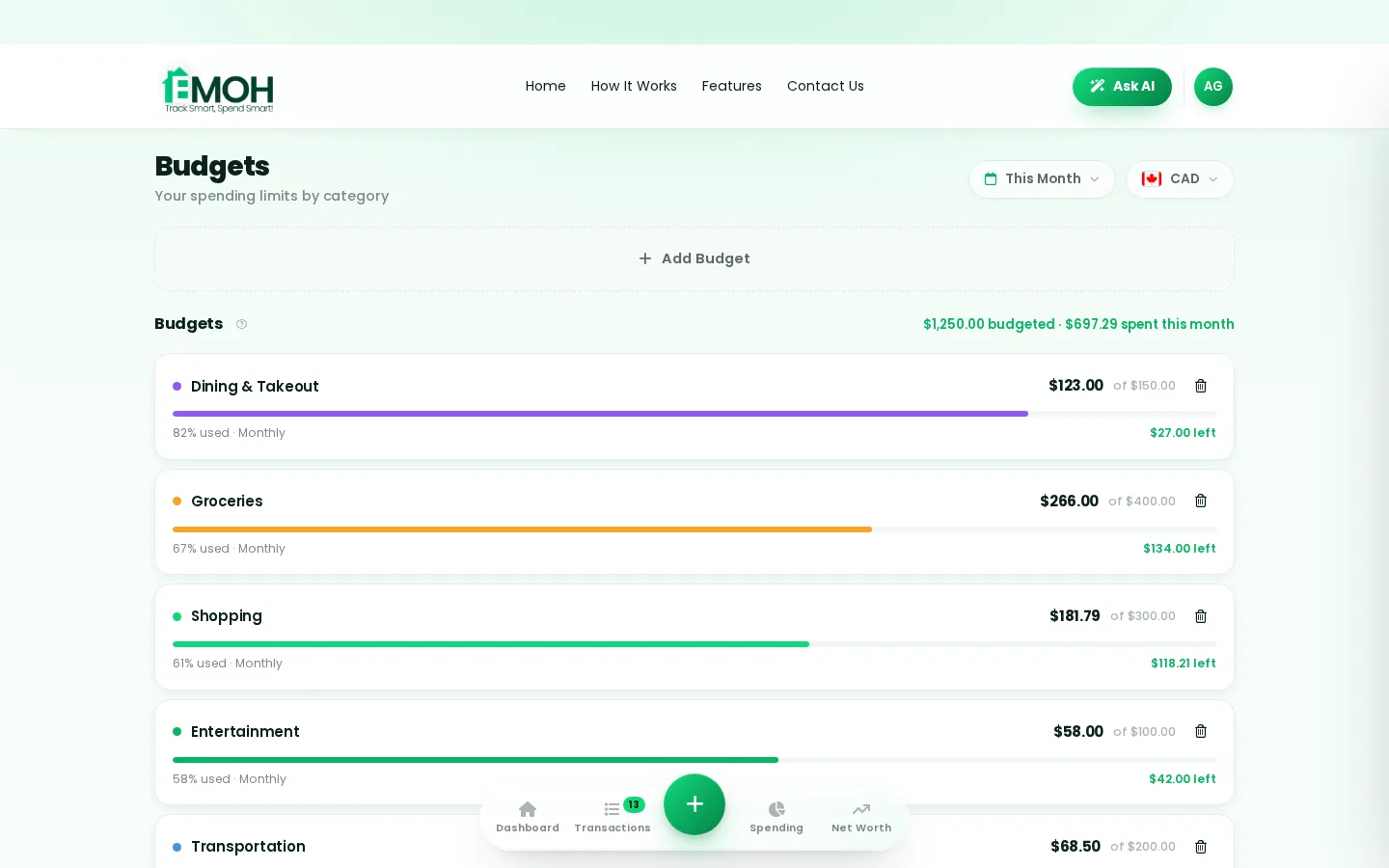
- Allows you to set category-wise budgets
- Improves money management for families
- Supports long-term stability
An app that offers strong budgeting tool features makes this process smooth and accurate.
8. Savings Goals and Expense Control: Turning Tracking Into Action
Tracking alone does not guarantee savings — action does.
How to convert tracking into savings:
- Review your weekly spending trends
- Identify categories that exceed limits
- Adjust unnecessary spending
- Set monthly savings goals
- Transfer the saved amount automatically
When your savings are tied to your real-time behaviour, progress becomes automatic.
9. Best Ways to Track Spending in Canada
Whether you’re a student, a parent, or managing a household, here are the best ways to control your finances:
1. Use a budgeting app (highest success rate)
A budgeting app gives you complete visibility and keeps everything stored automatically.
2. Create spending limits
Helps reduce emotional spending.
3. Analyze weekly reports
Short intervals improve behaviour faster.
4. Use goal-based tracking
Allows you to save intentionally.
5. Switch to digital receipts
Makes expense logs easier.
6. Use an expense tracker app Canada recommends
Apps made for Canadian users consider:
- Canadian currency
- Household structures
- Local financial habits
- Expense patterns
1. What is the easiest way to track expenses using EMOH Pay?
EMOH Pay makes expense tracking simple with automatic categorization, real-time insights, and shared household budgeting options.
2. Why is expense tracking important for saving money?
Because it reveals where your money actually goes, helping you control overspending and build stronger financial habits.
3. How does tracking expenses help you save money?
By giving you clarity on your spending patterns and allowing you to adjust habits before they lead to overspending.
4. How often should I track my expenses?
Tracking daily (even for 2–3 minutes) provides the most accurate results and keeps you aligned with your budget.
5. Is expense tracking helpful for families?
Yes. When families track spending together, it reduces confusion, improves transparency, and supports better long-term financial planning.
Try the savings goal calculator
Reading is step one — EMOH Pay makes it automatic. Free to start on phone and web.
Open it➜What should you know about everyday budgeting?
Everyday budgeting comes down to three habits: know what comes in, decide where it goes, and check in daily. EMOH Pay makes all three effortless — free expense tracking and budgets on phone and web, a Daily Money Digest each morning, and bank-grade AES-256 security throughout.
Everyday budgeting: the essentials
Money works better as a team sport — shared live numbers end the guesswork and the arguments.
You can start everyday budgeting today at $0 — no card required, on iPhone, Android or the web.
The first win in everyday budgeting is simply seeing where money goes. Tracking alone typically surfaces 10–15% of easy savings.
AES-256 encryption, read-only bank connections and PIPEDA-grade privacy keep your data yours.
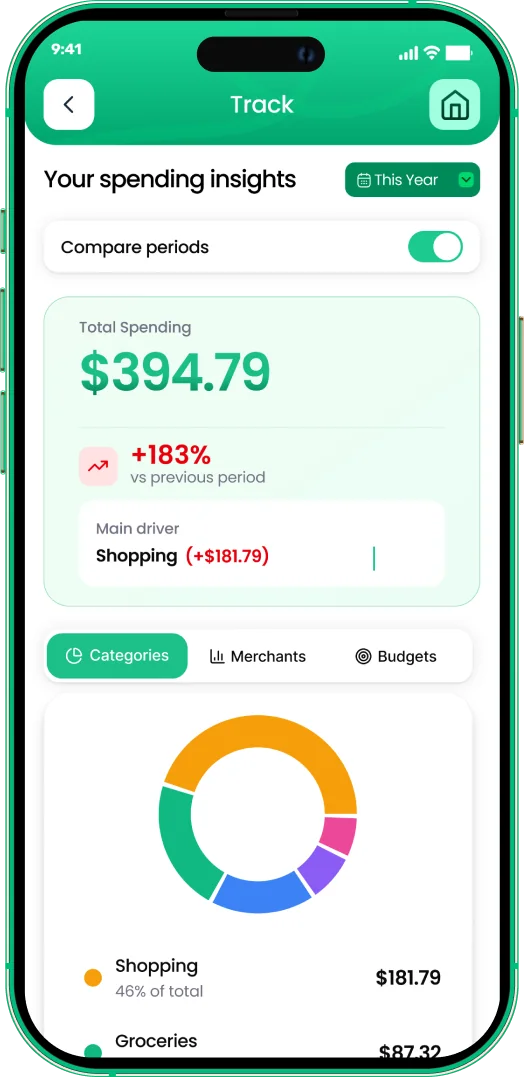
One app for everyday budgeting — on every screen.
Track on your phone in the checkout line, review on the web app at your desk. EMOH Pay keeps everyday budgeting in sync the second anything changes, so the numbers you act on are always current.
Start free on the web➜ Explore all features➜Real spending, really tracked
From the morning coffee to the monthly rent — Canadians log, tag and learn from every expense on EMOH Pay.


Everything you need for everyday budgeting
Track Smart, Spend Smart! The complete toolkit, free to start:
Log any expense in two taps — or let bank sync do it automatically. Every dollar gets a category.
Turn any month into a clean report you can share with a partner or accountant.
Digital envelopes for groceries, rent and fun, with gentle alerts before you overspend.
Ask questions about your own spending in plain language and get instant answers.
Everyone sees the same live numbers, each with their own login. Free forever.
One calm summary every morning: what you spent, what's left, what needs attention.
How to start everyday budgeting with EMOH Pay
Four small steps, five minutes total:
- 1Make your account — free, on phone or web
- 2Enter your income & accounts
- 3Set budgets — your digital envelopes
- 4Track smart, spend smart — EMOH digests daily
EMOH Pay vs. the usual ways to handle everyday budgeting
| EMOH Pay | Spreadsheet | Typical budgeting app | |
|---|---|---|---|
| Free tier | Free forever | Free | Limited trial |
| Paid tier | EMOH Pro — $4.99/mo | — | $10–15/mo |
| Expense tracking | ✔ Two taps or automatic | Manual entry | ✔ |
| Budgets & overspend alerts | ✔ Built in | ✖ None | Varies |
| Net worth tracking | ✔ Live | Formula gymnastics | Often paid add-on |
| Phone + web sync | ✔ Instant | ✖ Manual | Varies |
| Family sharing | ✔ Free | ✖ Shared-file chaos | Often paid add-on |
| GST/HST tracking | ✔ Automatic | ✖ Formula gymnastics | ✖ Rare |
| 148 currencies | ✔ Automatic conversion | ✖ None | Limited |
| Ask AI | ✔ Included | ✖ None | ✖ Rare |
| Daily Money Digest | ✔ Built in | ✖ None | Push spam |
| PDF & Excel exports | ✔ One tap | ✔ Manual | Varies |
| Bank sync (Canada) | ✔ Plaid, read-only — free up to 3 banks | ✖ None | US-first, patchy |
Everything above is free to start — and the full EMOH Pro upgrade is just $4.99/month, a third of what typical budgeting apps charge.
Real everyday budgeting problems we actually solve

Everyday budgeting that fits real life
Money habits only stick when they fit the life you already live. EMOH Pay was built for the checkout line, the kitchen-table conversation and the Sunday five-minute review — not for accountants. Two taps to log an expense, one glance to know where you stand.
Get started free➜ See how it works➜Your money data, protected like a bank's
The same encryption standard banks use, protecting your data at rest and in transit.
Bank connections run through Plaid and can only read transactions — never move money.
Built in Canada to Canadian privacy law. Your data is yours — never sold, ever.
Everyday budgeting — frequently asked questions
Is EMOH Pay free for everyday budgeting?
Yes — EMOH Pay is free to start on iPhone, Android and the web. Budgeting, expense tracking and net worth are all included, which covers everything you need for everyday budgeting. EMOH Pro lifts the limits for just $4.99/month — unlimited bank connections, family members and EMOH Smart, plus full report history and exports.
Do I need to connect my bank account?
No. Manual tracking is free forever and takes two taps per expense. If you want automatic imports, connect a Canadian bank securely through Plaid with read-only access — three banks on Free, unlimited on Pro.
Is my financial data safe with EMOH Pay?
Yes. EMOH Pay uses AES-256 encryption, bank connections are read-only through Plaid, and the app is built to Canadian PIPEDA privacy standards. Your data is never sold.
What is the best way to get started with everyday budgeting?
Start simple: create a free EMOH Pay account, enter your income and accounts, then set budgets for your top three spending categories. Most people are fully set up in about five minutes, and the Daily Money Digest keeps the habit going.
How is EMOH Pay different from a spreadsheet?
Spreadsheets are flexible but manual: no reminders, no sync, no automatic categorization. EMOH Pay gives you the same control with live sync across devices, daily digests, gentle overspend alerts and one-tap reports.
Does EMOH Pay work on both phone and computer?
Yes. EMOH Pay has full apps for iPhone and Android plus a complete web app, and everything syncs instantly. Phone in your pocket, web app at your desk — the same live numbers everywhere.
More from EMOH Pay
Managing your personal finances doesn’t have to be overwhelming, especially with the right tools at your fingertips. Canada…
16 Best Tips For Saving Money On GroceriesGrocery shopping is a part of daily life, but it can turn into a budget problem if one is not careful. When you shop for…
Expense Tracking App Take Control of Your Budget with EMOH PayManaging personal finances in today’s fast-paced world can be challenging. From rising living costs to unpredictable…
Free Budget CalculatorThe 50/30/20 rule splits after-tax income: 50% to needs, 30% to wants, 20% to savings. Enter your monthly take-home pay to…
Free Budgeting App CanadaEMOH Pay is a budgeting app made in Canada — free to start on iPhone, Android and the web. Set monthly budgets, track…
EMOH Pay vs YNABEMOH Pay vs YNAB compared honestly for 2026: price, Canadian features, family sharing, bank sync and learning curve — free…
Start free today
Free on iPhone, Android and the web. Upgrade to EMOH Pro anytime for bank sync and advanced AI.
Download for iOS➜ Get it on Android➜
