
Mastering Your Student Budget Canada: A Guide to Financial Success

Navigating post-secondary life is an exciting journey filled with new experiences, friendships, and learning opportunities. However, it also comes with the challenge of managing your finances. Creating a solid student budget Canada is the first step toward financial independence and peace of mind. This guide will walk you through everything from managing student loans to splitting bills with roommates, ensuring you can focus on what truly matters: your education.
Why Every Student Needs a Budget
A budget is simply a plan for your money. It helps you track your income and expenses so you can see where your money is going and make informed decisions. Without one, it’s easy to overspend, accumulate debt, and face financial stress. A well-planned budget allows you to cover your essential costs, save for future goals, and still have money left over for fun. It empowers you to take control of your financial future from day one.
Building Your Student Budget Canada: A Step-by-Step Guide
Creating a budget doesn’t have to be complicated. Let’s break it down into manageable steps.
1. Calculate Your Total Income
First, figure out how much money you have coming in each semester or academic year. Your income sources might include:
- Student Loans: Funds from programs like the Ontario Student Assistance Program (OSAP) or other provincial/federal loans.
- Scholarships and Bursaries: Money awarded for academic achievement, community involvement, or financial need.
- Family Contributions: Financial support from parents or other family members.
- Savings: Any personal savings you’ve set aside for your education.
- Part-time Income: Wages from a job on or off campus. A steady part-time income can significantly ease financial pressure.
Add all these sources together to get your total income for the term.
2. List Your Expenses
Next, identify all your costs. It’s helpful to divide them into fixed and variable expenses.
Fixed Expenses (Consistent each month):
- Tuition and Fees: The largest expense for most students.
- Rent: Your monthly housing cost.
- Utilities: Internet, hydro, and heating, if not included in rent.
- Phone Bill: Your monthly mobile plan.
- Subscriptions: Streaming services, gym memberships, etc.
Variable Expenses (Fluctuate each month):
- Groceries: Food, snacks, and household supplies.
- Transportation: Public transit passes, gas, or ride-sharing services.
- Textbooks and Supplies: Costs for course materials.
- Personal Care: Toiletries, haircuts, etc.
- Entertainment: Going out with friends, movies, concerts.
- Eating Out: Coffee, lunches, and restaurant meals.
Track your spending for a month to get an accurate picture of where your money goes. This will help you create a realistic budget.
3. Analyze and Adjust
Once you have your income and expenses listed, subtract your total expenses from your total income. If you have money left over, great! You can allocate it toward savings or paying down debt. If you’re in a deficit, you’ll need to find ways to either increase your income or reduce your spending. This is where mastering your student budget Canada becomes crucial.
Smart Strategies for Sticking to Your Budget
Knowing your numbers is one thing; sticking to the plan is another. Here are practical tips to help you manage your money effectively.
Mastering Rent and Shared Expenses
For many students, housing is the biggest monthly expense after tuition. Living with roommates is a common way to make it more affordable. Effective rent sharing is key to a harmonious living situation. You need a transparent system to track who has paid for what, from rent to shared groceries.
This is where a tool like the Emohpay app for Android and iOS becomes invaluable. Emohpay is designed to simplify shared finances. You can easily track, split, and settle expenses with your roommates directly through the app, eliminating confusion and awkward conversations about money. It ensures everyone pays their fair share on time.
Cutting Costs on Essentials
- Textbook Savings: University textbooks can be incredibly expensive. To achieve significant textbook savings , consider buying used books from your campus bookstore or online marketplaces. You can also rent digital versions or check if your university library has copies available. At the end of the semester, sell your books to recoup some of the cost.
- Meal Planning: Eating out frequently can quickly drain your bank account. A structured meal planning strategy is a game-changer. Plan your meals for the week, create a grocery list, and stick to it. Cooking in batches, packing your own lunch, and brewing coffee at home can save you hundreds of dollars each month.
Building a Financial Safety Net
Life is unpredictable. A car repair, a sudden trip home, or an unexpected medical expense can derail your budget if you’re not prepared. That’s why every student should build an emergency fund for students. Aim to save at least $500 to $1,000 in a separate savings account. This fund is strictly for true emergencies and will provide a crucial buffer when you need it most.
Frequently Asked Questions
How do I stretch OSAP over two terms? Divide your OSAP funding by the number of months in your school year and stick to a monthly spending limit.
What’s a smart student food budget? Aim for $300–$400 per month by meal planning, shopping sales, and cooking at home.
How do I track shared expenses with roommates? Use apps like Emohpay to easily split and track bills, groceries, and rent with your roommates.
How do I stretch OSAP over two terms?
Receiving a large lump sum from a student loan can be tempting to spend. The key to successful OSAP budgeting is to divide the total amount by the number of months in your school year (usually eight). For example, if you receive $8,000 for the year, you have a budget of $1,000 per month from that loan. Transfer only your monthly allowance from your savings account to your checking account each month. This prevents overspending and ensures the funds last the entire academic year.
What’s a smart student food budget?
A reasonable food budget for a Canadian student is typically between $300 and $400 per month. This amount allows for healthy, home-cooked meals with occasional treats. To stay within this budget, focus on buying staple items like pasta, rice, and beans in bulk. Take advantage of weekly flyers and sales at local grocery stores. Avoid convenience foods and pre-packaged meals, which are often more expensive and less healthy.
How do I track shared expenses with roommates?
Tracking shared expenses manually with spreadsheets or notes can be messy and lead to disputes. The easiest and most reliable method is to use a dedicated app. As mentioned, the Emohpay app is designed specifically for this purpose. It provides a clear, real-time record of all shared costs, from rent and utilities to groceries. You can add an expense, select who was involved, and the app automatically calculates who owes what. This transparency helps maintain good relationships with your roommates and keeps everyone accountable.
Your Path to Financial Wellness
Meta Description: Discover how to master your student budget Canada with practical tips on OSAP budgeting, textbook savings, meal planning, and managing shared expenses. Learn how Emohpay can simplify your financial life as a Canadian student. It sets the foundation for a life of financial stability and confidence. By tracking your income, managing your expenses, and using smart tools like Emohpay to handle shared costs, you can reduce stress and focus on your studies. Your financial future starts now—make it a bright one.
Explore budgeting in your province
Reading is step one — EMOH Pay makes it automatic. Free to start on phone and web.
Open it➜What should you know about everyday budgeting?
Everyday budgeting comes down to three habits: know what comes in, decide where it goes, and check in daily. EMOH Pay makes all three effortless — free expense tracking and budgets on phone and web, a Daily Money Digest each morning, and bank-grade AES-256 security throughout.
Everyday budgeting: the essentials
You can start everyday budgeting today at $0 — no card required, on iPhone, Android or the web.
The first win in everyday budgeting is simply seeing where money goes. Tracking alone typically surfaces 10–15% of easy savings.
Money works better as a team sport — shared live numbers end the guesswork and the arguments.
AES-256 encryption, read-only bank connections and PIPEDA-grade privacy keep your data yours.
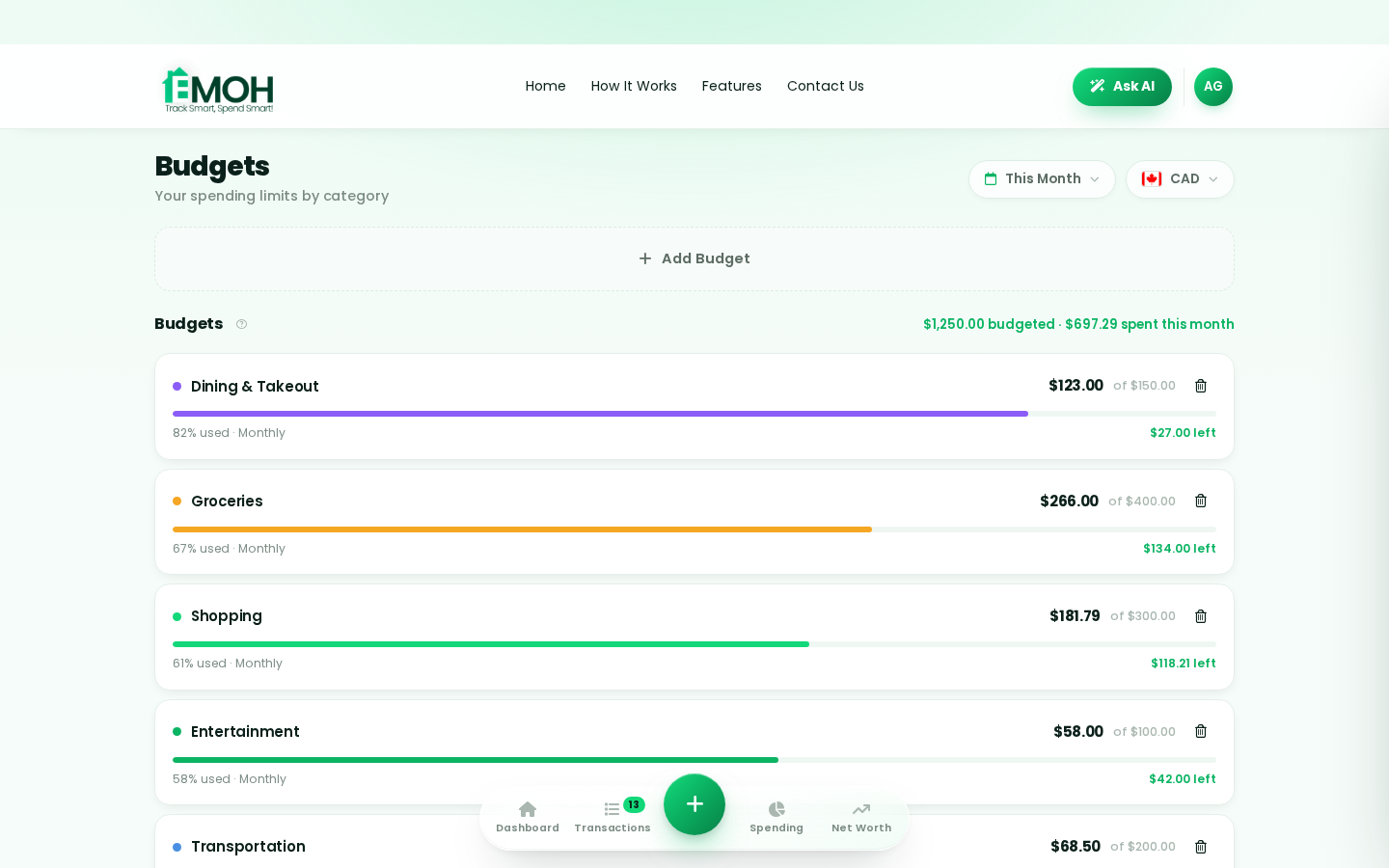
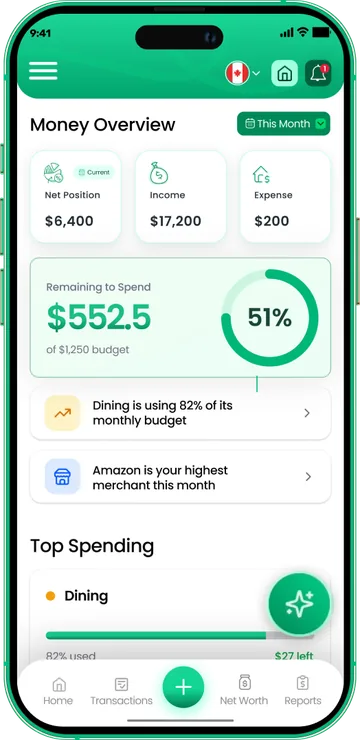
One app for everyday budgeting — on every screen.
Track on your phone in the checkout line, review on the web app at your desk. EMOH Pay keeps everyday budgeting in sync the second anything changes, so the numbers you act on are always current.
Start free on the web➜ Explore all features➜Real spending, really tracked
From the morning coffee to the monthly rent — Canadians log, tag and learn from every expense on EMOH Pay.



Everything you need for everyday budgeting
Track Smart, Spend Smart! The complete toolkit, free to start:
Ask questions about your own spending in plain language and get instant answers.
One calm summary every morning: what you spent, what's left, what needs attention.
Log any expense in two taps — or let bank sync do it automatically. Every dollar gets a category.
Digital envelopes for groceries, rent and fun, with gentle alerts before you overspend.
Everyone sees the same live numbers, each with their own login. Free forever.
Assets minus debts, always current — watch the number that actually measures progress.
How to start everyday budgeting with EMOH Pay
Four small steps, five minutes total:
EMOH Pay vs. the usual ways to handle everyday budgeting
| EMOH Pay | Spreadsheet | Typical budgeting app | |
|---|---|---|---|
| Free tier | Free forever | Free | Limited trial |
| Paid tier | EMOH Pro — $4.99/mo | — | $10–15/mo |
| Expense tracking | ✔ Two taps or automatic | Manual entry | ✔ |
| Budgets & overspend alerts | ✔ Built in | ✖ None | Varies |
| Net worth tracking | ✔ Live | Formula gymnastics | Often paid add-on |
| Phone + web sync | ✔ Instant | ✖ Manual | Varies |
| Family sharing | ✔ Free | ✖ Shared-file chaos | Often paid add-on |
| GST/HST tracking | ✔ Automatic | ✖ Formula gymnastics | ✖ Rare |
| 148 currencies | ✔ Automatic conversion | ✖ None | Limited |
| Ask AI | ✔ Included | ✖ None | ✖ Rare |
| Daily Money Digest | ✔ Built in | ✖ None | Push spam |
| PDF & Excel exports | ✔ One tap | ✔ Manual | Varies |
| Bank sync (Canada) | ✔ Plaid, read-only (Pro) | ✖ None | US-first, patchy |
Everything above is free to start — and the full EMOH Pro upgrade is just $4.99/month, a third of what typical budgeting apps charge.
Real everyday budgeting problems we actually solve

Everyday budgeting that fits real life
Money habits only stick when they fit the life you already live. EMOH Pay was built for the checkout line, the kitchen-table conversation and the Sunday five-minute review — not for accountants. Two taps to log an expense, one glance to know where you stand.
Get started free➜ See how it works➜Your money data, protected like a bank's
The same encryption standard banks use, protecting your data at rest and in transit.
Bank connections run through Plaid and can only read transactions — never move money.
Built in Canada to Canadian privacy law. Your data is yours — never sold, ever.
Everyday budgeting — frequently asked questions
Is EMOH Pay free for everyday budgeting?
Yes — EMOH Pay is free to start on iPhone, Android and the web. Budgeting, expense tracking and net worth are all included, which covers everything you need for everyday budgeting. EMOH Pro adds bank sync via Plaid and advanced AI for just $4.99/month.
What is the best way to get started with everyday budgeting?
Start simple: create a free EMOH Pay account, enter your income and accounts, then set budgets for your top three spending categories. Most people are fully set up in about five minutes, and the Daily Money Digest keeps the habit going.
Can I share my budget with my family?
Yes — Family Account Sharing is included free. Each member gets their own login while budgets and expenses stay shared in real time, which makes everyday budgeting a team effort instead of a solo chore.
Does EMOH Pay work on both phone and computer?
Yes. EMOH Pay has full apps for iPhone and Android plus a complete web app, and everything syncs instantly. Phone in your pocket, web app at your desk — the same live numbers everywhere.
How is EMOH Pay different from a spreadsheet?
Spreadsheets are flexible but manual: no reminders, no sync, no automatic categorization. EMOH Pay gives you the same control with live sync across devices, daily digests, gentle overspend alerts and one-tap reports.
Is my financial data safe with EMOH Pay?
Yes. EMOH Pay uses AES-256 encryption, bank connections are read-only through Plaid, and the app is built to Canadian PIPEDA privacy standards. Your data is never sold.
More from EMOH Pay
Start free today
Free on iPhone, Android and the web. Upgrade to EMOH Pro anytime for bank sync and advanced AI.
Download for iOS➜ Get it on Android➜