
Top Budget Categories Every Canadian Student Should Track in 2025

Trying to balance rent, tuition, and daily expenses on a student income? You’re not alone.
Whether you’re living on student loans, part-time work, or help from home, budgeting as a student in Canada can feel overwhelming. But the good news is — it doesn’t have to be.
In this guide, we break down the top budget categories for Canadian students to track in 2025. From groceries to emergency savings, knowing where your money goes is the first step toward financial confidence.
Why Budgeting Matters for Canadian Students
Living on a student budget in Canada means making smart choices — not sacrifices. By understanding your monthly budget for students in Canada , you can:
- Avoid unnecessary debt
- Stretch your money further
- Plan ahead for big expenses
- Build healthy money habits for the future
Whether you’re studying in Toronto, Vancouver, Halifax, or anywhere in between — this list of budget categories for Canadian students will help you take control.
Download Budget Tracking App
Android Download
iOS Download
Top Budget Categories for Canadian Students in 2025
1. Tuition and School Supplies
This is usually the biggest expense for students.
What to include :
- Tuition and enrollment fees
- Lab, library, or tech fees
- Textbooks and online course materials
- Software subscriptions (e.g., Grammarly, Adobe)
Tip: Buy used books or use library resources whenever possible.
2. Student Rent Expenses in Canada
Rent is often the largest monthly cost. This includes:
- Shared apartments or student housing
- Utilities (hydro, heat, water)
- Renter’s insurance
Average rent in Canada for students: $700–$1,200/month depending on city
3. Grocery Budget for Students
Don’t underestimate how much food costs — especially with inflation.
- Meal prepping helps reduce waste and spending
- Look for student discounts at local grocery stores
- Buy in bulk when possible
4. Transportation Costs for Students
Getting to campus, work, or home all adds up.
- Public transit (monthly passes or pay-as-you-go)
- Occasional rideshare or taxi costs
- If you drive: gas, insurance, parking
Many cities offer discounted student transit passes — use them!
5. Phone and Internet Bills in Canada
These bills are often overlooked but essential for staying connected.
- Mobile phone plan (student deals available)
- Wi-Fi/home internet (split with roommates if possible)
Tip : Avoid data overages by using Wi-Fi and setting limits.
6. Entertainment and Eating Out
Everyone deserves a little fun — but this category can spiral quickly if not tracked.
- Takeout and coffee runs
- Movies, concerts, social events
- Streaming services (Spotify, Netflix, etc.)
Set a limit for this category and stick to it. No guilt, just control.
7. Emergency Fund for Students
Life happens. Whether it’s a broken laptop, medical bill, or emergency flight home — having an emergency fund is critical.
- Aim for at least $500 to start
- Save a small amount monthly ($25–$50)
- Keep it in a separate savings account
Tracking your spending doesn’t mean watching every dollar like a hawk. It means being aware .
Use a student budget planner Canada offers — whether it’s a printable template, spreadsheet, or mobile app — to stay organized. The key is consistency.
Here’s how to get started:
- Pick a tool (see below)
- List your income (loans, part-time job, family support)
- Allocate funds by category
- Track weekly or biweekly
- Adjust based on real spending
Best Budgeting Tips for Students
- Start with the essentials (rent, tuition, groceries)
- Set a spending limit for non-essentials like takeout and fun
- Use student discounts wherever possible
- Review your budget every month and adjust
- Automate savings , even if it’s just $10/week
Pro Tip : Label your money by purpose — books, coffee, rent. This adds clarity.
Budgeting Apps for Students in Canada
Budgeting apps make things easier by syncing your bank accounts, categorizing expenses, and offering insights. Popular options include:
- EMOH Pay – Built for Canadians, beginner-friendly, and free to use
- Mint – Great for visual budgeting
- KOHO – Combines budgeting with cashback rewards
- You Need A Budget (YNAB) – Best for detailed planners
Many offer student plans or free trials, making them ideal for anyone living on a student budget in Canada .
Final Thoughts
Budgeting as a student in Canada may feel tough at first — but once you know your categories and stay consistent, it becomes second nature. Tracking these key budget categories for Canadian students will help you spend smarter, save more, and feel less stressed.
Want help getting started? Download our Budget tracking app
Android App – iOS App
Or try EMOH Pay — the app made for students like you.
FAQs
What should a student include in their budget in Canada?
Students should include tuition, rent, groceries, transportation, phone/internet bills, entertainment, school supplies, and emergency savings in their monthly budget.
How much do Canadian students spend monthly in 2025?
On average, Canadian students spend between $1,200–$2,000 per month in 2025 depending on location, lifestyle, and housing choices.
What are the biggest student expenses in Canada?
The top three student expenses are tuition, rent, and food. These usually take up 70–80% of a student’s monthly budget.
How do I create a budget as a Canadian student?
Start by listing your income sources and fixed costs. Then break down flexible categories like food and entertainment. Use a student budget planner or budgeting app for ongoing tracking.
Can I track my student expenses using apps in Canada?
Yes! There are several great budgeting apps for students in Canada like EMOH Pay and Mint that sync with your accounts and help you stay on track.
Try the free budget calculator
Reading is step one — EMOH Pay makes it automatic. Free to start on phone and web.
Open it➜What should you know about everyday budgeting?
Everyday budgeting comes down to three habits: know what comes in, decide where it goes, and check in daily. EMOH Pay makes all three effortless — free expense tracking and budgets on phone and web, a Daily Money Digest each morning, and bank-grade AES-256 security throughout.
Everyday budgeting: the essentials
Five minutes a week with a daily digest beats a perfect spreadsheet you abandon in February.
AES-256 encryption, read-only bank connections and PIPEDA-grade privacy keep your data yours.
You can start everyday budgeting today at $0 — no card required, on iPhone, Android or the web.
The first win in everyday budgeting is simply seeing where money goes. Tracking alone typically surfaces 10–15% of easy savings.
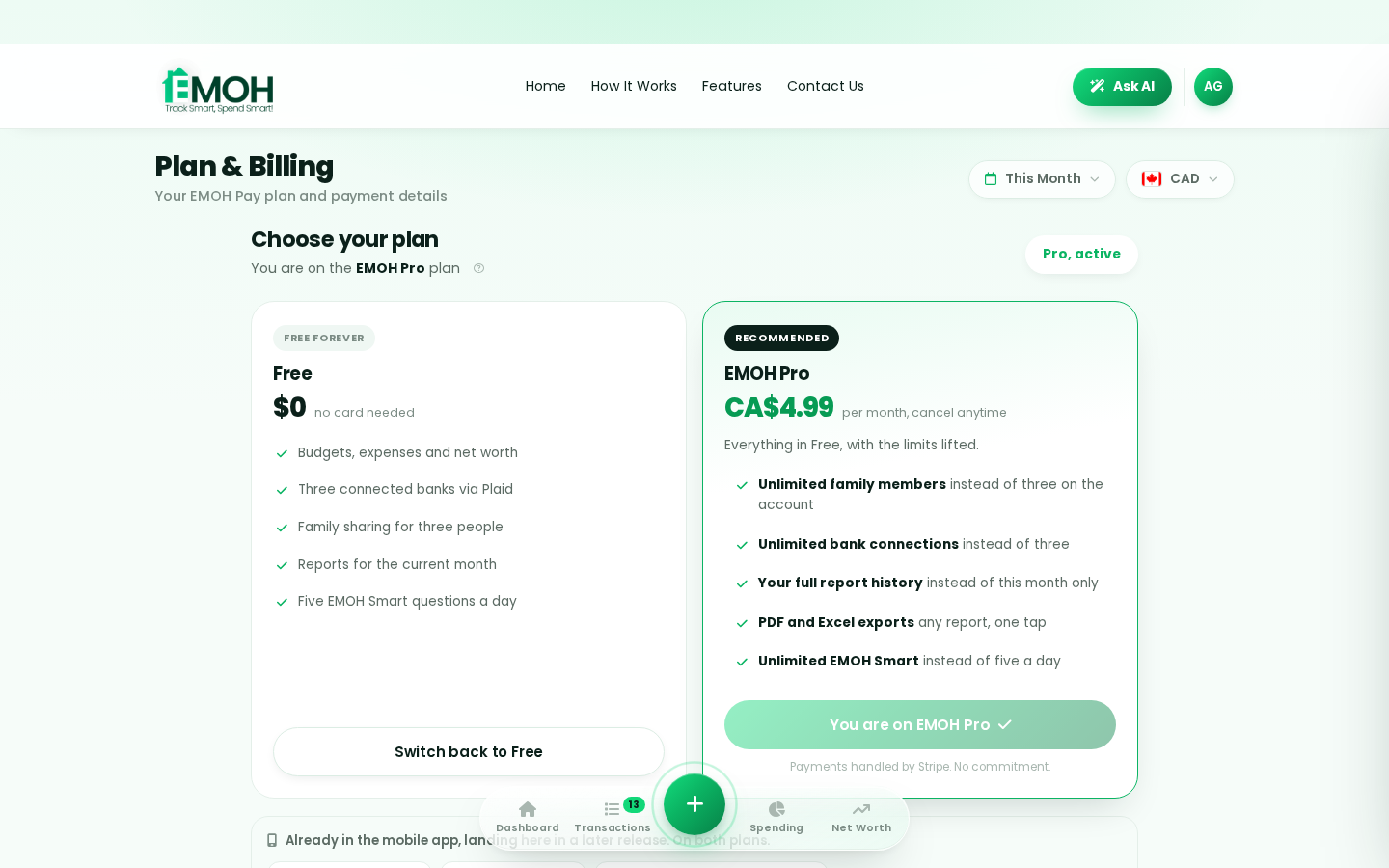
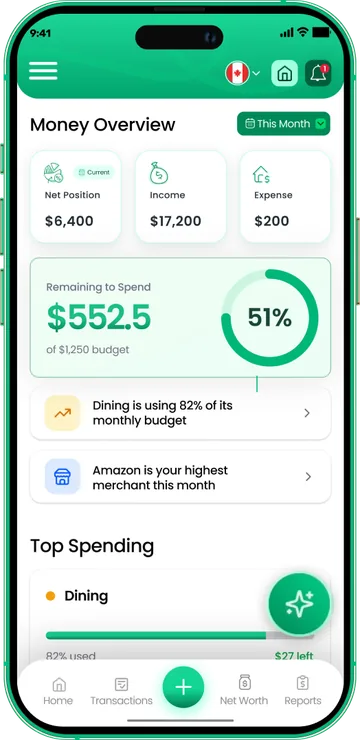
One app for everyday budgeting — on every screen.
Track on your phone in the checkout line, review on the web app at your desk. EMOH Pay keeps everyday budgeting in sync the second anything changes, so the numbers you act on are always current.
Start free on the web➜ Explore all features➜Real spending, really tracked
From the morning coffee to the monthly rent — Canadians log, tag and learn from every expense on EMOH Pay.



Everything you need for everyday budgeting
Track Smart, Spend Smart! The complete toolkit, free to start:
Log any expense in two taps — or let bank sync do it automatically. Every dollar gets a category.
The tax portion of every expense, separated automatically for a calmer tax season.
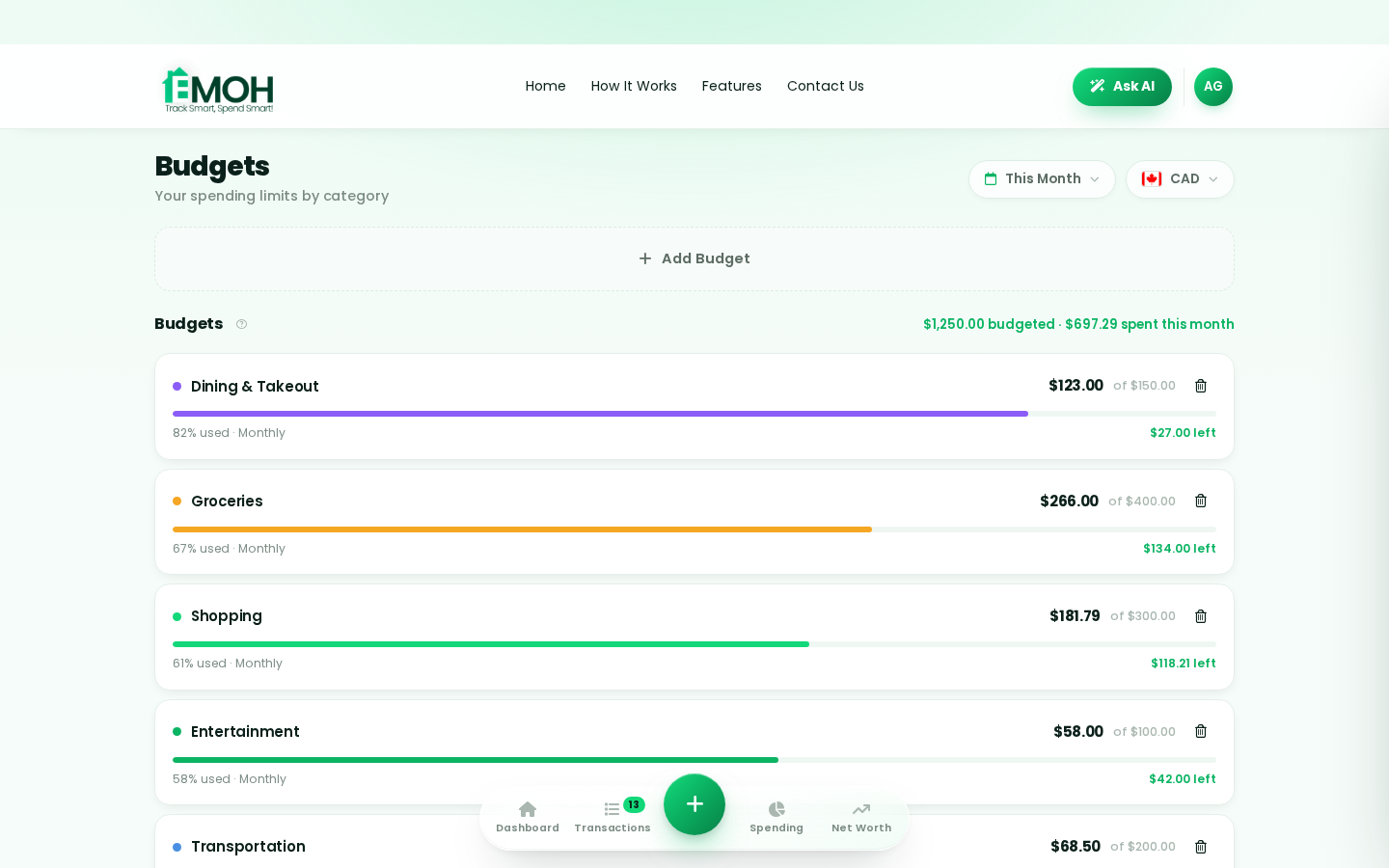
Digital envelopes for groceries, rent and fun, with gentle alerts before you overspend.
Vacations, emergencies, down payments — set the target and watch it fill.
Assets minus debts, always current — watch the number that actually measures progress.
One calm summary every morning: what you spent, what's left, what needs attention.
How to start everyday budgeting with EMOH Pay
Four small steps, five minutes total:
EMOH Pay vs. the usual ways to handle everyday budgeting
| EMOH Pay | Spreadsheet | Typical budgeting app | |
|---|---|---|---|
| Free tier | Free forever | Free | Limited trial |
| Paid tier | EMOH Pro — $4.99/mo | — | $10–15/mo |
| Expense tracking | ✔ Two taps or automatic | Manual entry | ✔ |
| Budgets & overspend alerts | ✔ Built in | ✖ None | Varies |
| Net worth tracking | ✔ Live | Formula gymnastics | Often paid add-on |
| Phone + web sync | ✔ Instant | ✖ Manual | Varies |
| Family sharing | ✔ Free | ✖ Shared-file chaos | Often paid add-on |
| GST/HST tracking | ✔ Automatic | ✖ Formula gymnastics | ✖ Rare |
| 148 currencies | ✔ Automatic conversion | ✖ None | Limited |
| Ask AI | ✔ Included | ✖ None | ✖ Rare |
| Daily Money Digest | ✔ Built in | ✖ None | Push spam |
| PDF & Excel exports | ✔ One tap | ✔ Manual | Varies |
| Bank sync (Canada) | ✔ Plaid, read-only (Pro) | ✖ None | US-first, patchy |
Everything above is free to start — and the full EMOH Pro upgrade is just $4.99/month, a third of what typical budgeting apps charge.
Real everyday budgeting problems we actually solve

Everyday budgeting that fits real life
Money habits only stick when they fit the life you already live. EMOH Pay was built for the checkout line, the kitchen-table conversation and the Sunday five-minute review — not for accountants. Two taps to log an expense, one glance to know where you stand.
Get started free➜ See how it works➜Your money data, protected like a bank's
The same encryption standard banks use, protecting your data at rest and in transit.
Bank connections run through Plaid and can only read transactions — never move money.
Built in Canada to Canadian privacy law. Your data is yours — never sold, ever.
Everyday budgeting — frequently asked questions
What is the best way to get started with everyday budgeting?
Start simple: create a free EMOH Pay account, enter your income and accounts, then set budgets for your top three spending categories. Most people are fully set up in about five minutes, and the Daily Money Digest keeps the habit going.
Do I need to connect my bank account?
No. Manual tracking is free forever and takes two taps per expense. If you want automatic imports, EMOH Pro connects Canadian banks securely through Plaid with read-only access.
Is EMOH Pay free for everyday budgeting?
Yes — EMOH Pay is free to start on iPhone, Android and the web. Budgeting, expense tracking and net worth are all included, which covers everything you need for everyday budgeting. EMOH Pro adds bank sync via Plaid and advanced AI for just $4.99/month.
Does EMOH Pay work on both phone and computer?
Yes. EMOH Pay has full apps for iPhone and Android plus a complete web app, and everything syncs instantly. Phone in your pocket, web app at your desk — the same live numbers everywhere.
Is my financial data safe with EMOH Pay?
Yes. EMOH Pay uses AES-256 encryption, bank connections are read-only through Plaid, and the app is built to Canadian PIPEDA privacy standards. Your data is never sold.
Can I share my budget with my family?
Yes — Family Account Sharing is included free. Each member gets their own login while budgets and expenses stay shared in real time, which makes everyday budgeting a team effort instead of a solo chore.
More from EMOH Pay
Start free today
Free on iPhone, Android and the web. Upgrade to EMOH Pro anytime for bank sync and advanced AI.
Download for iOS➜ Get it on Android➜