
How to Create a Vacation Budget Planner That Keeps You on Track

Dream of sandy beaches, mountain climbing, or fresh city discovery. Rest and relaxation call for vacations. While planning can be enjoyable, the associated costs can quickly turn it into stress. Vacation Budget Planners can be of good use to someone going on vacation.
This blog will motivate you to create a vacation budget plan that allows you to afford your ideal trip and return home free from financial regrets. We will go over the best saving strategies , financial planning , and common budgeting mistakes .
Why is the vacation budget planner important?
Let’s talk about why a vacation budget planner is so important before we discover how.
- A vacation budget planner shows you how much your trip will cost, thereby helping you to prevent overspending.
- Strong financial plans help you enjoy your holiday without financial concerns.
- A vacation budget template helps break travel objectives into more manageable pieces.
- Setting priorities helps you decide what you may remove from your vacation plans and what is absolutely required for financial allocation.
- Monitoring your savings can help you maintain your plan.
- Methodical Approach: Create a Vacation Planning Budget
Step-by-Step Guide to Creating Your Vacation Budget Planner
1. Set Your Financial Goals and Determine Your Trip’s Scope
- Define Your Destination and Duration: Where do you want to go, and how long will you stay? This is the foundation for your entire vacation budget planner . Be specific. “A beach vacation” is less helpful than “A 7-day trip to Cancun.”
- Establish a Realistic Budget: Consider your current financial situation, income, and other financial commitments. Be honest with yourself about how much you can realistically afford. This information is crucial for setting achievable financial goals .
2. Estimate Your Major Expenses
This phase is where your vacation budget template starts to take shape. Divide your expenses into categories:
Transportation :
- Flights: Research flight costs using various search engines and consider alternative airports or travel dates.
- Ground Transportation: Include costs for rental cars, taxis, public transportation, airport transfers, or train tickets.
- Gas/Tolls: If driving, estimate fuel consumption and potential toll fees.
Accommodation:
- Hotels/Resorts: Research hotel prices in your chosen destination. Consider different types of accommodation, such as vacation rentals, hostels, or guesthouses, to find options that fit your budget .
- Airbnb/Vacation Rentals: Explore options on platforms like Airbnb or VRBO, which can sometimes offer more affordable and spacious accommodations, especially for families or groups.
Food and Drinks:
- Restaurants: Estimate how much you’ll spend on meals. Consider a mix of dining out and cooking some meals yourself to save money.
- Groceries: If you plan to cook, research grocery prices in your destination.
- Snacks and Drinks: Factor in the cost of snacks, beverages, and alcoholic drinks.
Activities and Entertainment:
- Sightseeing: Research entrance fees for attractions, museums, and historical sites.
- Tours: If you plan to take any guided tours, factor in the cost.
- Entertainment: Include costs for shows, concerts, or other forms of entertainment.
- Excursions: Plan for any day trips or special outings.
Travel Insurance:
- Comprehensive Coverage: It’s highly recommended to purchase travel insurance to protect yourself against unexpected events like trip cancellations, medical emergencies, or lost luggage.
Visas and Passport Fees:
- Application Costs: If your destination requires a visa, research the application fees.
- Passport Renewal: Ensure your passport is valid for at least six months beyond your return date. If not, factor in the cost of renewal.
Miscellaneous Expenses:
- Souvenirs: Set a budget for gifts and souvenirs.
- Shopping: If you plan to do any shopping, allocate a specific amount.
- Tips: Factor in tipping customs in your destination.
- Unexpected Costs: It’s always a beneficial idea to include a buffer for unexpected expenses that may arise during your trip.
3. Create Your Vacation Budget Template
Now it’s time to put all your estimates into a structured vacation budget template . You can use a spreadsheet program like Google Sheets or Microsoft Excel, a budgeting app, or even a simple notebook.
Spreadsheet Method:
- Create columns for each expense category (Transportation, Accommodation, etc.).
- List specific expenses within each category (flights, hotels, etc.).
- Enter your estimated costs for each expense.
- Use formulas to calculate the total estimated cost, total actual cost, and the difference between them.
Budgeting Apps:
- Many budgeting apps offer features specifically designed for travel budgeting. These apps can help you track your spending, categorize expenses, and even convert currencies.
Notebook Method:
- If you prefer a more traditional approach, you can create a vacation budget planner in a notebook.
- Divide your notebook into sections for each expense category.
- List your estimated costs and track your actual spending as you go.
4. Implement Best Saving Strategies
Once you have your vacation budget template , it’s time to start saving! Here are some best saving strategies to help you reach your financial goals :
- Create a Dedicated Savings Account: Open a separate savings account specifically for your vacation fund. This step will help you keep your vacation savings separate from your regular savings.
- Automate Your Savings: Set up automatic transfers from your checking account to your vacation savings account. Even small, regular transfers can add up quickly.
5. During Your Vacation: Stick to Your Budget
Your vacation budget planner isn’t just for pre-trip planning; it’s also a valuable tool during your vacation.
- Track Your Spending: Use a budgeting app or a small notebook to track your expenses each day. This method will help you stay within your budget and avoid overspending.
- Be Mindful of Your Spending Choices: Make conscious decisions about how you spend your money. Choose affordable dining options, take advantage of free activities, and avoid impulse purchases.
- Use Cash When Possible: Using cash can help you stay within your budget by making it easier to visualize how much you’re spending.
- Don’t Be Afraid to Say No: If an activity or purchase doesn’t align with your budget, don’t be afraid to say no.
Easy Budgeting Tips for Couples
Planning a vacation as a couple requires effective communication and collaboration. Here are some easy budgeting tips specifically for couples:
- Have Open and Honest Conversations: Discuss your financial goals , priorities, and spending habits openly and honestly.
- Create a Couples Budget Planner : Work together to create a couples budget planner It reflects both your needs and preferences.
- Make Joint Decisions: Discuss and agree on major spending decisions together.
- Regularly Review the Budget Together: Schedule regular check-ins to review your progress and make any necessary adjustments.
Building a Strong Financial Foundation for Future Travels
Creating a vacation budget planner is a great way to manage your finances for a specific trip, but it’s also important to build a strong financial foundation for future travels and overall financial well-being.
- Create a Household Budget : Develop a comprehensive household budget that includes all your income and expenses. This process will help you track your spending, identify areas where you can save, and allocate funds for your travel goals.
- Invest for the Future: Consider investing a portion of your income for long-term financial goals, such as retirement.
Common Budgeting Mistakes to Avoid
Even with the best intentions, it’s easy to make common budgeting mistakes . Here are some to watch out for:
- Underestimating Costs: Be realistic and thorough when estimating your expenses. It’s better to overestimate than underestimate.
- Forgetting Miscellaneous Expenses: Don’t forget to factor in smaller expenses, such as tips, souvenirs, and snacks.
- Not Tracking Spending: Failing to track your spending can quickly lead to overspending.
- Impulse Purchases: Avoid making impulsive purchases, especially during your vacation.
- Not Being Flexible: Be prepared to adjust your plans if necessary to stay within your budget.
Conclusion
A smart vacation budget planner is your friend for allowing your dream trip without compromising your financial objectives.
Following these proven financial tips , using the best saving strategies , and avoiding common budgeting mistakes will help you create a strong financial foundation , travel stress-free, and return home with amazing memories and a healthy bank account. To keep neat, use a vacation or trip budget template or planner. Happy planning and vacation!
Try the free budget calculator
Reading is step one — EMOH Pay makes it automatic. Free to start on phone and web.
Open it➜What should you know about everyday budgeting?
Everyday budgeting comes down to three habits: know what comes in, decide where it goes, and check in daily. EMOH Pay makes all three effortless — free expense tracking and budgets on phone and web, a Daily Money Digest each morning, and bank-grade AES-256 security throughout.
Everyday budgeting: the essentials
Five minutes a week with a daily digest beats a perfect spreadsheet you abandon in February.
Money works better as a team sport — shared live numbers end the guesswork and the arguments.
You can start everyday budgeting today at $0 — no card required, on iPhone, Android or the web.
Auto-categorization, recurring bills and bank sync take the admin out of the habit.
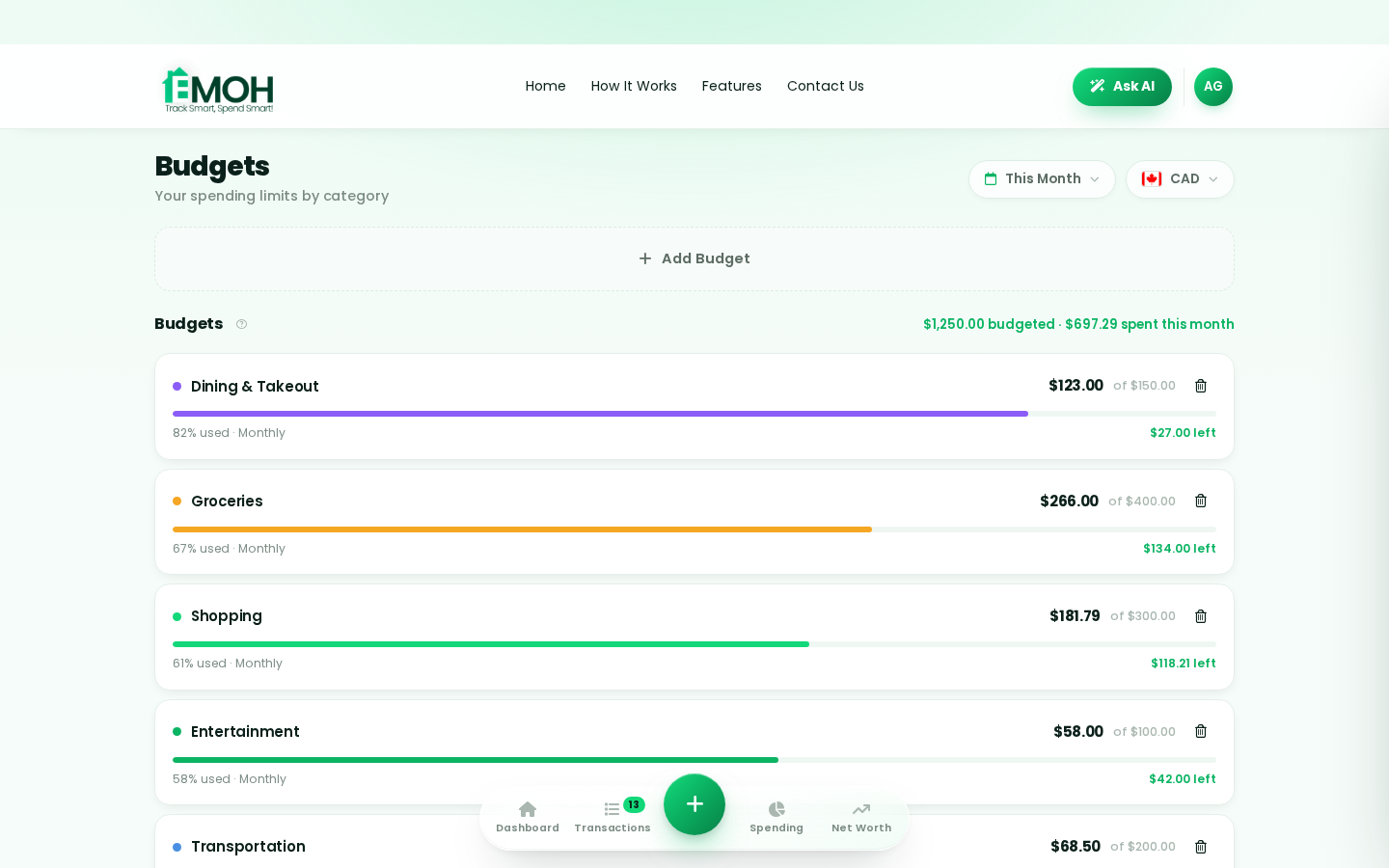
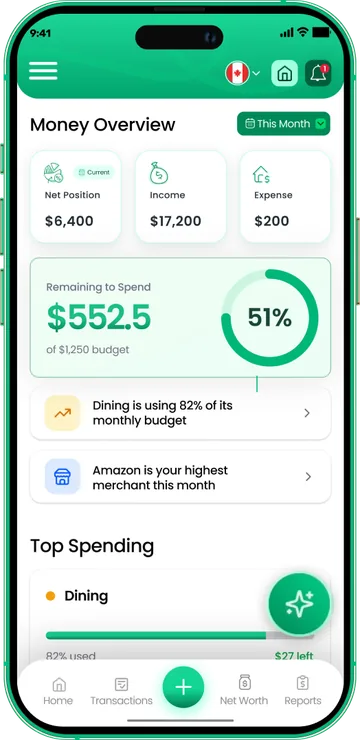
One app for everyday budgeting — on every screen.
Track on your phone in the checkout line, review on the web app at your desk. EMOH Pay keeps everyday budgeting in sync the second anything changes, so the numbers you act on are always current.
Start free on the web➜ Explore all features➜Real spending, really tracked
From the morning coffee to the monthly rent — Canadians log, tag and learn from every expense on EMOH Pay.



Everything you need for everyday budgeting
Track Smart, Spend Smart! The complete toolkit, free to start:
Log any expense in two taps — or let bank sync do it automatically. Every dollar gets a category.
Assets minus debts, always current — watch the number that actually measures progress.
Digital envelopes for groceries, rent and fun, with gentle alerts before you overspend.
Vacations, emergencies, down payments — set the target and watch it fill.
The tax portion of every expense, separated automatically for a calmer tax season.
Turn any month into a clean report you can share with a partner or accountant.
How to start everyday budgeting with EMOH Pay
Four small steps, five minutes total:
EMOH Pay vs. the usual ways to handle everyday budgeting
| EMOH Pay | Spreadsheet | Typical budgeting app | |
|---|---|---|---|
| Free tier | Free forever | Free | Limited trial |
| Paid tier | EMOH Pro — $4.99/mo | — | $10–15/mo |
| Expense tracking | ✔ Two taps or automatic | Manual entry | ✔ |
| Budgets & overspend alerts | ✔ Built in | ✖ None | Varies |
| Net worth tracking | ✔ Live | Formula gymnastics | Often paid add-on |
| Phone + web sync | ✔ Instant | ✖ Manual | Varies |
| Family sharing | ✔ Free | ✖ Shared-file chaos | Often paid add-on |
| GST/HST tracking | ✔ Automatic | ✖ Formula gymnastics | ✖ Rare |
| 148 currencies | ✔ Automatic conversion | ✖ None | Limited |
| Ask AI | ✔ Included | ✖ None | ✖ Rare |
| Daily Money Digest | ✔ Built in | ✖ None | Push spam |
| PDF & Excel exports | ✔ One tap | ✔ Manual | Varies |
| Bank sync (Canada) | ✔ Plaid, read-only (Pro) | ✖ None | US-first, patchy |
Everything above is free to start — and the full EMOH Pro upgrade is just $4.99/month, a third of what typical budgeting apps charge.
Real everyday budgeting problems we actually solve

Everyday budgeting that fits real life
Money habits only stick when they fit the life you already live. EMOH Pay was built for the checkout line, the kitchen-table conversation and the Sunday five-minute review — not for accountants. Two taps to log an expense, one glance to know where you stand.
Get started free➜ See how it works➜Your money data, protected like a bank's
The same encryption standard banks use, protecting your data at rest and in transit.
Bank connections run through Plaid and can only read transactions — never move money.
Built in Canada to Canadian privacy law. Your data is yours — never sold, ever.
Everyday budgeting — frequently asked questions
How is EMOH Pay different from a spreadsheet?
Spreadsheets are flexible but manual: no reminders, no sync, no automatic categorization. EMOH Pay gives you the same control with live sync across devices, daily digests, gentle overspend alerts and one-tap reports.
Can I share my budget with my family?
Yes — Family Account Sharing is included free. Each member gets their own login while budgets and expenses stay shared in real time, which makes everyday budgeting a team effort instead of a solo chore.
Is my financial data safe with EMOH Pay?
Yes. EMOH Pay uses AES-256 encryption, bank connections are read-only through Plaid, and the app is built to Canadian PIPEDA privacy standards. Your data is never sold.
Is EMOH Pay free for everyday budgeting?
Yes — EMOH Pay is free to start on iPhone, Android and the web. Budgeting, expense tracking and net worth are all included, which covers everything you need for everyday budgeting. EMOH Pro adds bank sync via Plaid and advanced AI for just $4.99/month.
Do I need to connect my bank account?
No. Manual tracking is free forever and takes two taps per expense. If you want automatic imports, EMOH Pro connects Canadian banks securely through Plaid with read-only access.
What is the best way to get started with everyday budgeting?
Start simple: create a free EMOH Pay account, enter your income and accounts, then set budgets for your top three spending categories. Most people are fully set up in about five minutes, and the Daily Money Digest keeps the habit going.
More from EMOH Pay
Start free today
Free on iPhone, Android and the web. Upgrade to EMOH Pro anytime for bank sync and advanced AI.
Download for iOS➜ Get it on Android➜